Make a decision, improve a customer interaction, prepare reliable records, or choose technology that fits the work. These guides combine explanations, worked examples, and practical checks.
Decisions, people, and meetings

Critical Thinking and Creative Problem Solving: A Practical Decision Method
Define the problem, test assumptions, compare alternatives, and run a small decision experiment with a worked example and reusable worksheet.

Leadership Development: Turn Practice and Feedback into Better Management
Build a practical development plan around a real management skill, coached assignments, useful feedback, and evidence of changed behavior.

Retirement of Experienced Workers: Preserve Knowledge Before a Handoff
Identify critical knowledge, capture exceptions, practice handoffs, and check successor readiness before an experienced colleague leaves.

Video Conferencing Systems: Plan and Test a Small Meeting Room
Compare room systems and laptop-based setups, define practical requirements, and test sound, framing, sharing, accessibility, and operating responsibilities.

Audience Response Systems: Design Polls That Improve a Meeting
Choose a response method, write useful questions, plan accessible participation, and interpret meeting polls with clear counts and limits.

Personal Web Conferencing: Run a Reliable Ad Hoc Meeting
Prepare external-guest calls, share the intended content, support participation, and finish with clear decisions and actions.

Conference Interpretation Systems: Plan a Multilingual Meeting
Prepare a language brief, coordinate interpreters and audio channels, and rehearse a multilingual meeting with a workable fallback.

Conference Phones: Choose Connections and Fix Poor Meeting Audio
Match the audio device to the calling service, test every seat, and isolate echo, weak pickup, and routing problems.

HD Video Conferencing: Diagnose Picture Quality
Separate camera, lighting, encoding, network, and screen-sharing problems with a repeatable video-quality test.

Corporate Leadership: Evaluate a Workforce-Education Partnership
Define responsibilities, support learners, and distinguish participation, demonstrated skills, and outcomes when assessing a corporate education program.

Babble and the Limits of Desktop Speech Privacy
Understand Babble’s historical voice-privacy idea and evaluate speech intelligibility, room layout, and privacy claims in an office.
Customers, service, and payments

CRM for Small Teams: Choosing a System and Making It Useful
Understand CRM records, test a real sales workflow, compare operating responsibilities, and migrate customer data with care.

Customer Care: Own the Problem from First Contact to Resolution
Build a customer-care process with clear ownership, useful handoffs, sensible escalation, and measures that reflect resolution.

Customer Loyalty: Turn Feedback into Retention Improvements
Connect customer feedback to specific improvements, measure retention with clear cohort definitions, and interpret results without confusing response scores with behavior.

Handheld Payment Processing: Terminals, Phone Readers, and Tap to Pay
Compare field-payment setups, understand offline limits, calculate practical costs, and reconcile sales, refunds, and bank payouts.
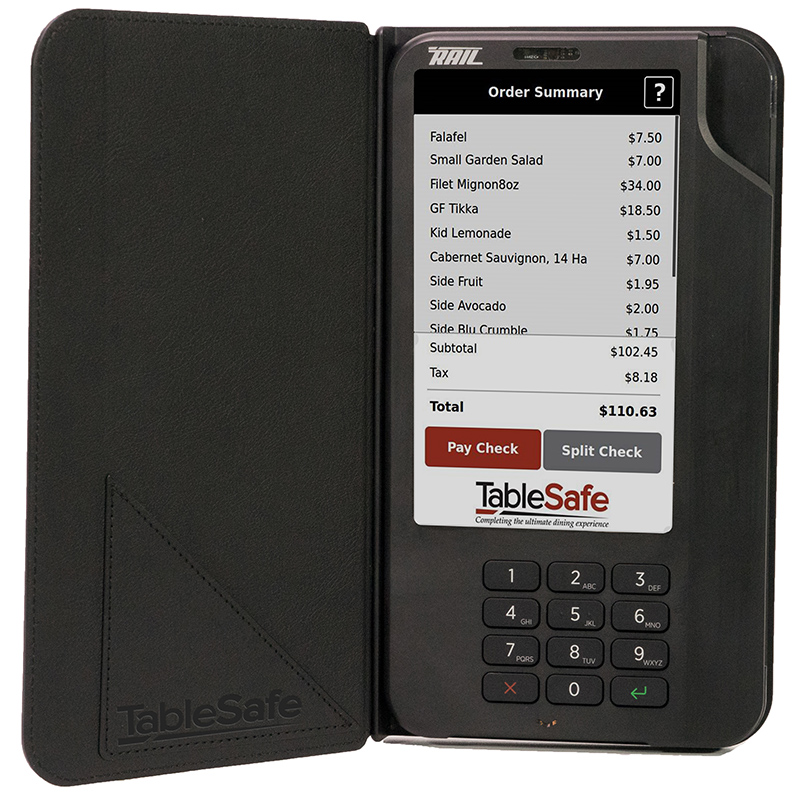
Pay-at-the-Table Technology in Restaurants
Pay-at-the-table technology has grown from early EMV billfold devices into a broader restaurant payments model built around security, speed, guest control, mobile wallets, QR codes, and modern point-of-sale integration.

The Connected Consumer
Connected consumers move fluidly among phones, stores, social platforms, AI assistants, loyalty apps, smart devices, and physical experiences, forcing brands to compete on relevance, trust, convenience, and control.
Processes, data, and providers

Business Process Management: Find Delays and Redesign the Work
Use a purchase-request example to map work, separate waiting from effort, improve handoffs, and understand when BPMN and automation help.

Business Automation: Build a Dependable Workflow
Choose an automation method, follow an invoice example, plan exception handling, and distinguish saved time from cash savings.

BPM Software: Evaluate a Platform with a Real Workflow
Evaluate workflow software with repeatable cases for approvals, exceptions, permissions, integration, process changes, and exit requirements.

Adaptive Data Integration: Handle Changing Data Without Silent Errors
Recognize schema changes, validate business meaning, quarantine uncertain records, and reconcile a pipeline with a downloadable fictional data exercise.

IT Change Management: Plan, Test, Deploy, and Recover
Define a software change, test a representative pilot, set rollout gates, prepare recovery, and verify that the business workflow still works.

Outsourcing Risks: Evaluate the Provider, the Cost, and the Exit
Assess outsourcing with a practical risk register, evidence checks, a complete cost example, and a tested transition plan.

Benefits of Outsourcing: Build and Test the Business Case
Compare delivery options, distinguish cash savings from released capacity, and test outsourcing benefits with a complete cost example.

BPEL: Understand and Assess a Legacy Orchestration Process
Read the parts of a BPEL workflow, trace failures and compensation, and prepare evidence for a maintenance or migration decision.
Budgets, records, and performance

Small Business: Build a Records and Tax-Preparation Routine
Organize U.S. small-business income, expenses, supporting documents, and monthly checks so tax preparation begins with usable records.

How to Build a Small-Business IT Budget
Plan recurring services, equipment replacements, support, and reserve funding with a fictional worked example and editable budget.

Email Retention: Records, Holds, and Deletion Policies
Build an email retention schedule around record categories, triggering events, preservation obligations, and tested system behavior.

Electronic Signatures, Digital Signatures, and Encryption
Understand signing intent, document integrity, encryption, audit evidence, and the limits of legal and technical validation.

Corporate Performance Management: A Worked Monthly Review
Connect budgets, forecasts, and actual results with a verified variance example, an editable workbook, and decisions tied to evidence.
AI in business

10 Ways AI Is Transforming Business
AI is moving from isolated experiments into core business systems, changing customer service, decision making, marketing, operations, finance, security, product development, and the way teams work.
Planning, projects, and technology

Business Technology Optimization: Improve the Systems That Matter
Map technology to a business task, measure failures and delays, and choose improvements using a worked order-entry example.

Web Filtering and Reporting: Set Useful Controls and Interpret the Logs
Choose a filtering approach, test business workflows, handle false positives, and interpret web-access reports with clear limits.

SAP Systems: Understand the Workflow Before an Implementation
Follow a purchase-to-payment example, identify shared data and responsibilities, and prepare meaningful SAP acceptance tests.

Business Trends: Turn External Signals into Decisions
Build a focused indicator watchlist, check definitions and dates, and connect economic, social, and resource trends to business choices.

Project Management Books: Choose a Reading Path for the Work
Compare four project-management reading options by purpose, check editions, and turn a useful chapter into a small workplace exercise.

Smart Card Readers: Match the Card, Interface, and Application
Identify card and host requirements, distinguish reader and software roles, and test a complete smart-card workflow before buying.

Business Books: Choose Reading for a Specific Problem
Match a business book to a practical question, check its scope and evidence, and turn reading into a small workplace exercise.

Glasses-Free 3D Monitors: Test the Viewing Experience
Compare viewer position, audience size, content preparation, and a readable 2D fallback before selecting a glasses-free 3D display.

Meeting Maker Millennium: Preserve and Validate Calendar Data
Identify legacy Meeting Maker exports and check dates, recurrence, attendees, and resource bookings before trusting a calendar migration.
International business and shipping

Multinational Corporations: Coordinate Work Across Borders
Understand cross-border enterprise structures, map responsibilities and dependencies, and rehearse a disruption with a worked order example.

UPS China: Prepare and Track a Cross-Border Shipment
Build a clear shipment brief, check current UPS China tools and document requirements, and organize a useful response to a delivery or clearance delay.

Business in China: Build a Market Research Brief
Define a specific customer, test partner capabilities, and separate evidence from assumptions before planning a China business venture.
Historical business coverage
Dated product announcements, company reports, and book coverage provide historical context. Specifications, prices, forecasts, and availability reflect their publication periods.
- rCard — 2005 historical coverage.
- Building Wealth System Book by Russ Whitney — 2003 historical coverage.
- Fourth Mega Market — 2000 historical coverage.