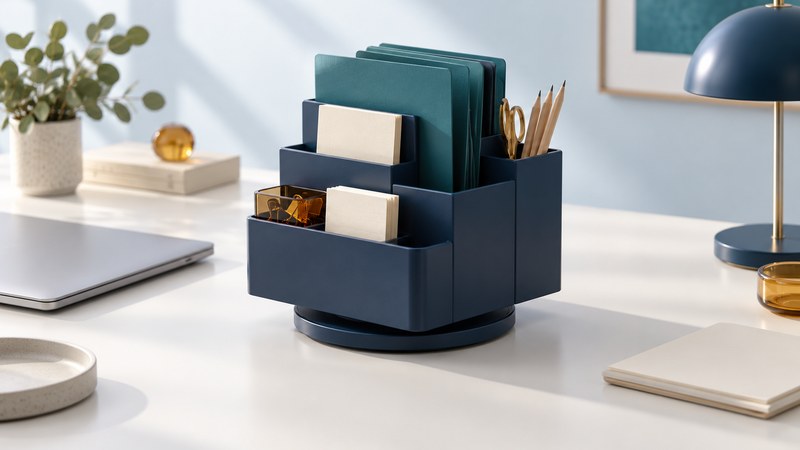
A rotating desk organizer works when its compartments match the supplies you reach for and its full turning area fits the desk. The Desk Apprentice, introduced by Staples in 2005 in connection with The Apprentice, brought this idea to a large organizer for writing tools, notepads and files. The useful question today is whether that style of storage suits your workspace.
For an existing Desk Apprentice, measure the actual unit and inspect its condition. For a replacement, compare the exact model's dimensions and compartments. Current rotating organizers can be much smaller and may be intended only for writing tools; the shared name for the format does not establish equivalent capacity.
Begin with the items you use
Collect the objects you expect to store and sort them by how frequently you use them. Keep a representative working quantity on the desk and place reserve stock elsewhere. This makes the test about daily access rather than filling every compartment.
| Item group | What to measure or count | Retrieval check |
|---|---|---|
| Pens, pencils and markers | Useful quantity, longest length and thickest barrel | Can you identify and grip one without moving the others? |
| Scissors and small tools | Closed dimensions and required cover | Are handles easy to retrieve while tips remain protected? |
| Notepads and cards | Width, height and thickness of the working stack | Can you remove a sheet or pad without bending it? |
| Folders and documents | Actual outer dimensions, tabs and intended stack thickness | Can loaded folders enter and leave without catching? |
| Clips and small parts | Quantity and suitable removable container | Can you see and collect them without reaching among sharp tools? |
Use the desk-organizer fit record to keep the inventory, measurements and trial results together. The tool is an editable text record; fill it with your own dimensions and units.
Measure the turning envelope
Measure the clear desk area after placing the keyboard, mouse, monitor base and the open notebook or document you normally use. A rotating unit needs clearance through the entire turn, including protruding files and handles. Its parked width can understate the space it sweeps.
For an irregular shape or an off-center pivot, ask for the maximum rotating envelope or measure the actual sweep. A paper outline can help visualize the occupied area, but verify the real unit under its intended load before relying on the arrangement.
Keep cords and drinks outside the sweep. Check vertical clearance beneath a shelf and make sure tall folders leave the monitor visible. If the unit pushes frequently used tools beyond easy reach, compare a lower tray or smaller containers. The workstation planning guide helps evaluate the surrounding desk arrangement.
Check usable compartments, not just outer size
Outer dimensions describe the space an organizer occupies. Usable compartment width and depth determine what fits inside. Tapered walls, dividers and rounded corners can reduce that space; bring a sample pad, folder and tool when inspecting a unit.
For example, Staples lists its ST63868 five-compartment rotating organizer at 5.75 × 5.75 × 4.75 inches and describes storage for pens, pencils, scissors and other accessories. That specification illustrates the difference between a small supply holder and the larger Desk Apprentice concept. It does not establish hanging-file compatibility or replace measurements of an existing Desk Apprentice.
If file storage matters, establish whether the organizer supports ordinary folders standing in a slot or suspended hanging folders on rails. Check the actual folder format, rail spacing and loaded thickness. A slot that accepts a loose sheet may fail to accommodate a folder's tabs or hanging hardware.
For a used unit, inspect the base, pivot, joints and dividers for cracks, looseness or missing parts. Ask for photographs of the underside and compartments. Verify return terms and included components; a product name alone cannot establish the condition of an individual item.
Test it with the intended load
- Place the working set. Use actual tools and representative loaded folders. Keep within any documented capacity.
- Turn slowly through the full range. Watch the base, projecting contents and nearby equipment. Stop if it binds, tips or strikes something.
- Retrieve the frequent items. Try from your usual seated position. Confirm you can take one item and return it without unloading a section.
- Check shared use. Ask other regular users to try their tasks and hand positions. Place dangerous or delicate items according to the office's storage rules.
- Reassess after normal work. Note what migrates onto the desk, which compartments jam and which remain unused. Adjust the working quantities before deciding that more storage is needed.
A successful arrangement preserves an open work area and makes common items predictable to find. If rotation adds an extra step without improving access, a fixed tray, drawer insert or separate file rack may be a better fit for that desk.
Keep the arrangement small enough to use
Remove duplicates, empty pens and obsolete papers during an occasional reset. Clean the unit using instructions appropriate to its material and moving parts. Address wobble or binding before adding more weight, and keep reserve supplies out of the rotating working set.
The Desk Apprentice's lasting design question is how much useful access a single central unit provides for the area it occupies. Answer it with the supplies and desk you have. For individual tools, see choosing office scissors and choosing and testing graphite pencils, or return to Office Supplies.