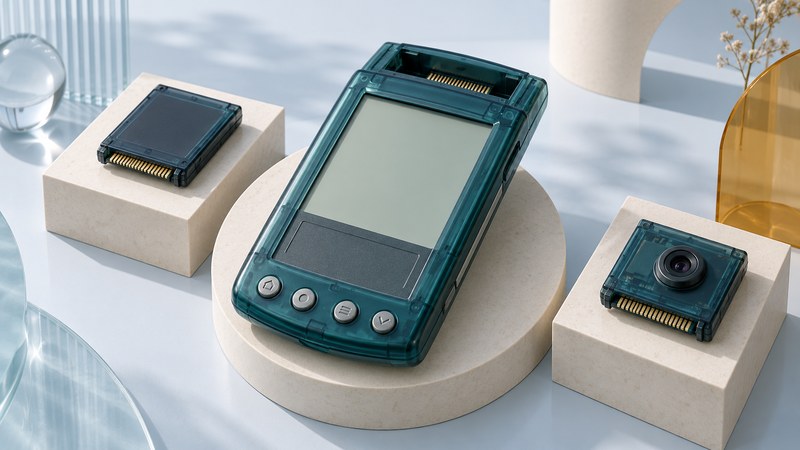
A Handspring Visor is a Palm OS organizer built around expansion. To understand one, identify the handheld, the Springboard module and the software or data that makes the combination useful.
The broad rear expansion bay is central to the Visor's design. A module could add a camera, storage or another function while keeping the familiar organizer interface. For collectors and returning owners, the important question is whether a particular combination can still complete its intended task.
Start with the exact Visor
Record the model from the device or packaging, the OS/application versions shown on screen, the cradle or cable, and any inserted module. A case color is a clue, but an explicit model identifier and matching handbook are stronger evidence.
Scroll the table horizontally to see every column. Keyboard users can focus the table region and use the arrow keys.
| Device | Documented clue | Why it matters |
|---|---|---|
| Original Visor | The original handbook describes two AAA alkaline batteries and a rear Springboard bay. | Use its own power and data-retention instructions. |
| Visor Prism | Color display, 8MB memory and an internal rechargeable battery with charging cradle. | A cradle's charging role depends on the handheld. |
| Visor Neo | Two AAA alkaline batteries; a USB HotSync cradle was supplied. | Distinguish its synchronization cradle from the Prism charging arrangement. |
| Visor Edge | Uses a detachable Springboard slot attachment. | Check that the required attachment is present. |
Primary references: the original Visor handbook (PDF), Handspring Prism specification sheet (PDF), Neo user guide, and the March 2001 Springboard white paper (PDF). These manufacturer documents are preserved by third-party hosts.
What Springboard added
Handspring's white paper describes modules carrying their own software, with a direct system-bus connection that allowed code to run from the module. Its open shape accommodated protruding components such as lenses, antennas or batteries. The platform supported both handheld-powered modules and designs with their own power arrangements.
This explains the appeal: an accessory could bring both hardware and its handheld interface. Evaluate the complete task as a separate question. Capturing a photograph, transferring that photograph to a desktop and opening the resulting file are three different milestones. A module's application appearing on screen establishes only the first part of its availability.
The Palm-family guide places Handspring in the wider PDA history. The Palm software guide covers general installation and preservation. Here, keep the module and its dependencies at the center of the investigation.
Build a compatibility record for one module
- Identify it precisely. Record manufacturer, product name, hardware revision and any visible software version. Photograph connectors and labels without dismantling the device.
- Find the module instructions. Check supported Visor models, required adapters and supplied components. Keep the module manual separate from the handheld manual so exceptions remain visible.
- Establish its power arrangement. Determine whether it uses handheld power, its own batteries or a specified charging setup. Follow that product's instructions; the existence of a powered cradle is insufficient evidence for a different accessory.
- List the complete task. Include desktop software, drivers, maps, media or subscriptions wherever the intended function depends on them. Distinguish what you have from what remains unverified.
- Plan a small reversible test. After protecting existing data, use disposable material to check recognition, the main function, storage and export. Record the result at each stage.
Record uncertainty plainly: “module recognized; desktop export untested” is useful evidence. Avoid turning a single successful combination into a compatibility claim for every Visor model or desktop OS.
Keep the working combination together
Preserve existing Palm Desktop user folders and backups before synchronization. Review the selected user and conduit actions; keep a dated copy of the desktop state before making changes. For unique data held by a module, establish its own backup or export route as well.
Keep the module, required attachment, cable, software media and documentation associated with the correct handheld. In the inventory, describe each component's role. Future owners benefit from knowing which item supplies power, which moves data and which contains the application.
Leave original archives intact and use duplicates for conversions or experiments. Compare copied records with representative originals and document any unreadable files. A restorable setup also needs its versions and instructions, not just a folder of unidentified files.
Download the Visor and Springboard module record (plain text) for one documented combination. Repeat it for each module; keep untested combinations clearly marked.
Explore handheld computing
Handheld computers: work devices, accessories and classic PDAs