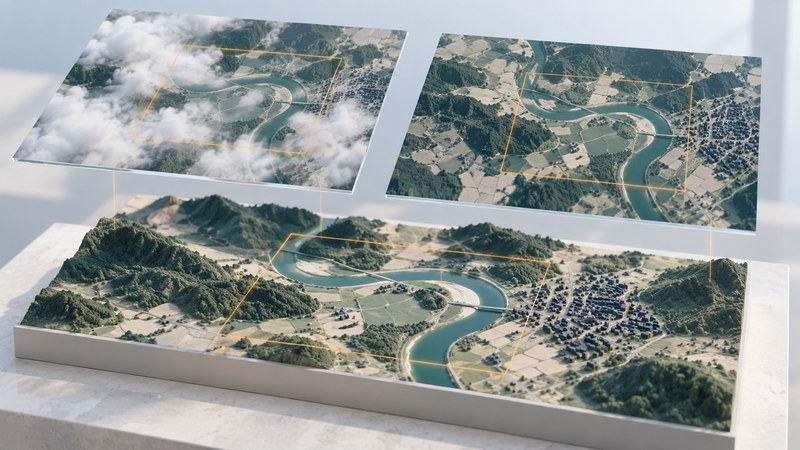
Choose Earth imagery by the question it can answer. A sharp picture, a timely observation, and a scientifically comparable measurement are different strengths. Start with the area, feature size, dates, and evidence you need, then select a dataset whose metadata support that task.
This guide helps you choose and compare existing satellite or aerial images. For a first project, use a small area and a clearly visible question, such as how the apparent water extent in one reservoir differs between two dates.
Write a small image specification
| Criterion | What to record | Why it matters |
|---|---|---|
| Area and feature size | Boundary and smallest feature you need to distinguish. | Pixel size limits the detail available for interpretation. |
| Observation date | Acquisition time, season, and acceptable time window. | A recently published mosaic can contain older observations. |
| Bands and product | Visible, infrared, radar, or derived product; processing level. | Different measurements support different questions. |
| Usable coverage | Clouds, shadows, snow, gaps, and scene footprint over your area. | A low scene-wide cloud percentage can still hide your site. |
| Use and delivery | License, attribution, format, coordinates, and download access. | The image must be usable in the final project, not just viewable. |
Distinguish sampling from feature detection. A 30-meter grid cell covers a nominal 30 × 30-meter area in its map grid, but a narrow stream inside it contributes only part of that pixel’s signal. Zooming in enlarges the cells; it does not recover unmeasured detail. Positional accuracy is another property to check separately.
For a regional pattern, broad coverage and repeat observations may matter more than seeing individual buildings. For a small site, suitably dated aerial imagery may provide the needed detail. When a question concerns vegetation or water properties, look for the relevant measured bands and validated products instead of judging solely by a natural-color preview.
Find a scene and read its metadata
USGS EarthExplorer provides a search route for satellite and aerial archives. Follow the USGS Landsat access guidance for current access options; downloads and some functions may require an account.
- Set a small area of interest under Search Criteria and choose a date window that fits your question.
- Choose a dataset in Data Sets. For a Landsat comparison, deliberately choose the collection and processing level you intend to analyze.
- Use Additional Criteria where available to narrow the search, then inspect Results.
- Examine each candidate’s footprint and browse image. Check clouds over the actual site, including cloud shadows.
- Open the metadata and save the product identifier, acquisition date, sensor, processing level, and coordinate reference information.
- Download the appropriate science product and quality information for analysis. Keep its metadata alongside it.
A browse image is useful for screening. Its display colors and compression may differ from the underlying measurement files. For regional context, NASA’s Worldview provides another way to explore imagery; read the chosen layer’s date and product information before treating it as a measurement source.
Make a fair two-date comparison
For the reservoir exercise, seek two dates in a comparable seasonal window, ideally using the same sensor and product. Keep the area and display band assignment consistent. If one candidate is clouded over the shore, find another date and record the changed interval.
Align the rasters to an appropriate common grid before counting change. Check recognizable stable features, such as a road junction, for alignment. Keep the processing and resampling choices in your notes. Resampling a coarse image onto a fine grid increases the number of cells while retaining the original information limits.
Use comparable display stretches for a visual pair. Independent automatic contrast enhancement can make two similar scenes look dramatically different. For numerical analysis, use the actual values and quality masks; a screen color is a display choice.
Shadows, seasonal vegetation, sediment, and water depth can complicate a water boundary. Draw a conservative comparison area, exclude obstructed pixels, and document ambiguous edges. A validated classification method and independent checks are needed before reporting a measured area with strong confidence.
Check processing before doing arithmetic
USGS Landsat Collection 2 surface reflectance products are processed for atmospheric effects. Their stored integers need the documented scale and offset; cloud, shadow, fill, and other quality information still require attention.
For Collection 2 Level-2 surface reflectance, USGS gives reflectance = stored value × 0.0000275 − 0.2 in its scale-factor guidance. With an invented valid pixel value of 18,639, the result is 0.3125725. This formula belongs to that product; other products can have different scaling.
Apply the relevant quality rules before interpreting values. Check whether your software has already scaled the data, so you avoid applying the conversion twice. Keep the native values or original files, and record any transformed output clearly.
Keep a comparison record
Save both scene identifiers, acquisition dates, data provider, product versions, bands, quality exclusions, reference system, resampling, and display settings. Write down the observed difference separately from its proposed explanation and the evidence still needed.
Download the imagery selection and comparison worksheet. It includes the reservoir exercise, metadata fields, a scaling check, and a final checklist for a reproducible image pair.
Related reading
- Aerial mapping imagery: Examine positional accuracy and the camera-to-orthophoto workflow.
- Yangtze River: Apply a dated image comparison to lakes, sediment, and a coastal plume.
- Goma and Nyiragongo: Compare a satellite image with a dated eruption map and report.