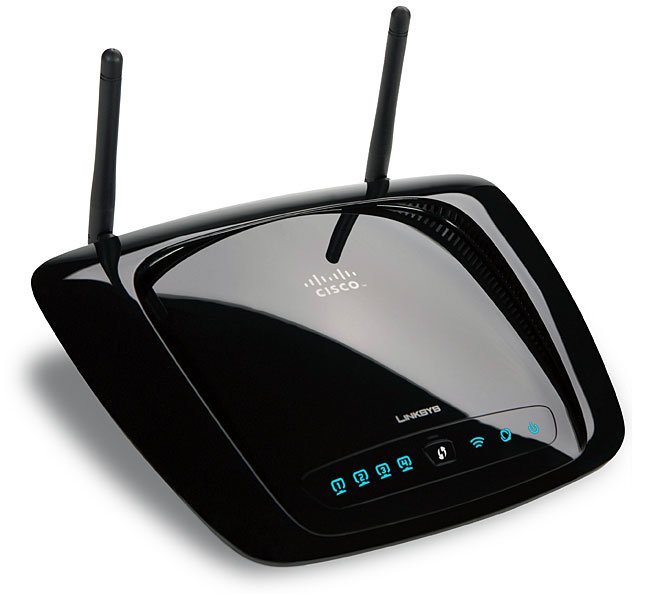
The Cisco media router was the Linksys by Cisco Wireless-N Broadband Router with Storage Link, model WRT160NL. Announced on June 23, 2009, it arrived during a transitional moment in home networking: 802.11n was replacing 802.11g, USB storage was becoming a consumer NAS substitute, and the long-lived WRT54GL had made Linux-based Linksys routers popular with networking hobbyists. It belongs near the home-networking ideas behind MoCA coax networking and mesh systems.
The WRT160NL was not a Cisco enterprise router. It was a consumer and small-office/home-office Linksys product sold during Cisco's ownership of Linksys. Cisco had acquired Linksys in 2003 and later sold its home networking business, including Linksys products, to Belkin in 2013. Cisco's own support notice now states that Linksys Home Networking and Linksys Small Business products are no longer supported by Cisco.
What Made It a Media Router
The "media router" idea centered on the Storage Link USB 2.0 port. A user could attach a USB hard drive or flash drive and share files across the local network. The built-in UPnP AV media server could stream music, photos, and video to PCs and compatible digital media adapters. In 2009, this was an attractive way to add basic network storage without buying a dedicated NAS, before USB 3 made external storage feel much less constrained.
The Storage Link feature supported FAT16, FAT32, and NTFS storage devices in read/write mode. That was useful for Windows households, but it also reflected the limits of the time. FAT32 has file-size limits, NTFS performance on small embedded routers can be modest, and USB storage attached to a router is not a substitute for a modern NAS with snapshots, redundancy, indexing, user isolation, and active security maintenance.
Hardware and Features
- Model: Linksys by Cisco WRT160NL Wireless-N Broadband Router with Storage Link
- Wireless: 2.4 GHz 802.11b/g and draft 802.11n support with MIMO
- Ethernet: one Internet/WAN port and four 10/100 Ethernet LAN ports
- Storage: USB 2.0 Storage Link port for FAT16, FAT32, and NTFS drives
- Media: built-in UPnP AV media server for compatible clients
- Antennas: two detachable antennas with R-SMA connectors
- Security features: WEP, WPA, WPA2, RADIUS support, SPI firewall, NAT, and Wi-Fi Protected Setup button
- Platform: Linux-based firmware, with third-party software notices listing Linux 2.6.15 and other open-source components
Contemporary product notes also described a 400 MHz processor, 8 MB of flash memory, and 32 MB of RAM. Those numbers were reasonable for a 2009 consumer router, but they are tiny by current standards. The 10/100 Ethernet ports alone make the WRT160NL unsuitable for modern broadband plans above 100 Mbps, even before considering Wi-Fi range, security updates, or CPU capacity.
Why It Followed the WRT54GL
The WRT54GL mattered because it kept a Linux-based Linksys platform alive after some other WRT54G revisions moved away from Linux-friendly hardware. The WRT160NL was often seen as a spiritual successor because it combined Wireless-N, detachable antennas, USB storage, and Linux firmware in a consumer router that appealed to the same audience: people who wanted more control than a sealed appliance offered.
That said, the WRT160NL was not simply a faster WRT54GL. It belonged to the 802.11n generation, used a different hardware platform, added Storage Link media sharing, and shipped in the sleeker Linksys by Cisco design language. Its value was as much about experimentation and flexible home networking as raw speed.
Support and Security Status
In 2026, the WRT160NL should be treated as legacy equipment. Cisco no longer supports Linksys home networking products because the Linksys business was sold to Belkin in 2013. Linksys maintains a lifecycle policy for its products, but old routers eventually pass from active support to end-of-support, after which they no longer receive software fixes, technical support, or security updates.
The open-source firmware picture has also aged. OpenWrt's device data for the WRT160NL notes that support for the device ended in 2022, with 19.07.10 as the last official build for 4/32-class devices. That matters because unsupported router firmware is risky on an internet-facing gateway. Old OpenSSL, old kernel code, weak defaults, and unpatched web interfaces can turn a nostalgic router into a security liability.
Best Uses Today
The WRT160NL is best understood as a historical router, a collector device, or a low-risk lab unit kept off the public internet. It can still illustrate how consumer routers evolved from simple NAT boxes into small Linux appliances with wireless, storage, media serving, firewalls, and web configuration. It is not a good primary router for a modern home.
- Use it only on an isolated lab network or behind a fully supported primary router.
- Do not expose its administration interface to the internet.
- Disable WPS if the firmware allows it, and use WPA2 with a strong password if wireless is enabled.
- Avoid relying on USB Storage Link for sensitive or irreplaceable data.
- Prefer a current router or access point for daily internet access, security updates, and modern Wi-Fi performance.
Why It Still Matters
The WRT160NL captured a specific moment in home networking. Broadband speeds were climbing, families were collecting digital media libraries, and router makers were trying to turn the home gateway into a small network hub. Its USB media sharing now looks primitive, but the idea behind it was durable: the router was becoming the always-on device that tied together internet access, local files, wireless clients, and media playback.
Modern routers, mesh systems, NAS devices, and smart home hubs have split those jobs into more specialized products. The WRT160NL sits at the point where they were still being combined into one compact box.