MoCA, short for Multimedia over Coax Alliance, is a wired networking technology that uses the coaxial cable already installed for cable TV, satellite, antennas, DVRs, and broadband service. Instead of treating coax as a single-purpose television wire, MoCA adds an IP data layer that can carry Ethernet traffic between rooms without opening walls or pulling new Cat 6 cable.
That idea was already important when this article was first published in 2007. It matters even more now. Homes have more Wi-Fi access points, streaming boxes, game consoles, workstations, networked storage, and cameras than they did when early MoCA-compatible tuner chips appeared. Wi-Fi has become far faster, but the best Wi-Fi networks still need a reliable wired backhaul. In many houses, the most practical wire is the coax that is already stapled through the walls.
Why MoCA Still Matters
MoCA is useful when Ethernet is not already available in the rooms where stable bandwidth is needed. A pair of MoCA adapters can bridge Ethernet over coax between a router and another room. More nodes can be added where the coax plant supports them, making MoCA a backbone for mesh Wi-Fi access points, home offices, media rooms, and set-top boxes.
- Wired stability: MoCA is less exposed to Wi-Fi congestion, walls, neighboring networks, and device roaming behavior.
- High throughput: MoCA Home 2.5 supports up to 2.5 Gbps of actual MAC throughput, with many consumer adapters now pairing the coax link with 2.5 GbE Ethernet ports.
- Low latency: MoCA Alliance lists MoCA Home 2.5 at less than 2.5 ms one-way average latency, making it well suited to gaming, video calls, and access-point backhaul.
- Reuse of existing wiring: It can avoid the cost, disruption, or rental-property restrictions that come with installing new Ethernet runs.
- Security features: MoCA 2.5 added stronger privacy, MoCA Protected Setup, remote provisioning options, and MoCASec peer-to-peer link security.
- Backward interoperability: MoCA 2.5 is designed to interoperate with earlier MoCA 2.0 and 1.1 devices, although the fastest speeds require compatible nodes and Ethernet ports at both ends.
Frequency Planning
MoCA works by placing data signals on radio-frequency channels carried by the coax. Current MoCA Home material describes a usable spectrum of 400 MHz to 1675 MHz, while many home installations use the upper MoCA bands above traditional cable TV frequencies. Older consumer guidance often referred to 1125-1525 MHz; modern MoCA 2.5 equipment and splitters are commonly planned out to 1675 MHz.
That frequency detail is the heart of the compatibility story. Traditional cable TV and older DOCSIS services were mostly below 1 GHz, which left room for MoCA above them. DOCSIS 3.1 and DOCSIS 4.0 changed the planning problem by pushing cable broadband toward wider spectrum. CableLabs describes DOCSIS 4.0 as including Extended Spectrum DOCSIS up to 1.8 GHz, which overlaps the range where MoCA may operate. In a home with new cable broadband gear, MoCA is not simply a plug-anywhere assumption; the coax layout, filters, splitters, amplifier, modem, and provider plan all matter.
Installation Details That Decide Whether It Works Well
The most reliable MoCA installations start with a map of the coax. Identify the incoming provider line, the first splitter, every branch, any amplifier, and the outlets that actually need data. Old splitters, corroded fittings, unterminated ports, and amplifiers that do not pass MoCA frequencies can turn a promising setup into an unstable one.
- Use splitters rated for the MoCA band, often labeled 5-1675 MHz or otherwise marked for MoCA, and avoid extra splitter stages where possible.
- Install a point-of-entry MoCA filter where the coax enters the home when the coax is connected to a cable provider. The filter helps keep the private MoCA network inside the home and can improve reflected MoCA signal strength inside the coax plant.
- Terminate unused splitter ports with 75-ohm terminators to reduce reflections and noise.
- Be cautious with cable amplifiers. Many older amplifiers block or distort MoCA frequencies unless they are designed with a MoCA bypass or compatible return path.
- Check whether the router, gateway, DVR, or set-top box already has a MoCA bridge enabled. Two bridges between the same Ethernet and coax networks can create a loop.
- For multi-gigabit internet, buy adapters with 2.5 GbE ports. A MoCA 2.5 coax link behind a 1 GbE port will still be limited by that Ethernet interface.
MoCA, Wi-Fi, Ethernet, and Powerline
Ethernet remains the cleanest answer when it is already present or easy to install. MoCA is the next-best wired answer in many coax-rich homes, especially for Wi-Fi backhaul. Powerline networking is easier to try, but its performance depends heavily on electrical panels, circuit paths, noise sources, and breakers. Wi-Fi mesh is convenient, but a wireless backhaul consumes airtime and can become inconsistent in dense or difficult buildings. A MoCA-backed access point lets Wi-Fi serve nearby devices instead of spending part of its capacity talking to another mesh node.
MoCA is not ideal for every coax system. Satellite TV installations may use frequency ranges that collide with MoCA unless the equipment is specifically designed for coexistence. Cable providers rolling out high-split, mid-split, or DOCSIS 4.0 service may also have specific guidance about filters and where a MoCA bridge should sit relative to the cable modem. In mixed networks, the safest approach is to keep the modem path clean and use MoCA on the in-home side of the network wherever the layout allows.
The 2007 Cable Tuner Story
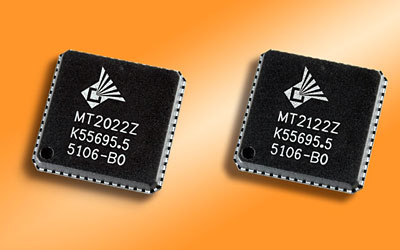 Microtune introduced two 1.1 GHz TV tuner chips for advanced 1 GHz set-top boxes at a time when cable operators were trying to offer in-home digital networking without asking customers to install new wires. Based on CableLabs DOCSIS and OpenCable specifications, the MicroTuner MT2022 DOCSIS Set-top Gateway (DSG) Tuner and the MT2122 Analog/Digital Video Tuner were positioned as companion tuners for personal video recorder set-top boxes supporting the MoCA specification.
Microtune described the MT2022 and MT2122 as the industry's first 1.1 GHz tuners that were MoCA-compatible without additional filtering. That mattered because MoCA transmissions share the same coaxial wiring that carries cable entertainment and broadband signals. A set-top box tuner had to tolerate a more crowded RF environment while preserving the cable services customers already expected to work.
The MicroTuner MT2122 was a fully integrated single-chip tuner designed for analog and digital OpenCable PVR set-top boxes. The MicroTuner MT2022 was a fully integrated single-chip tuner designed for DOCSIS Set-top Gateway functionality. In 2007, that was a forward-looking set-top design problem. Today, the same basic coexistence problem appears across cable gateways, MoCA adapters, Wi-Fi extenders, whole-home DVRs, and broadband upgrades.
What Changed Since 2007
The original promise was simple: use the coax already in the home to move video, music, photos, and data between devices. The modern version is broader. MoCA has become a practical way to give Wi-Fi access points a wired backbone, to connect rooms that cannot easily receive Ethernet, and to extend fiber or broadband service through existing coax in single-family homes, apartments, hotels, hospitals, and other buildings.
The speed target changed as well. Early MoCA field trials focused on reliable 100 Mbps usable throughput. MoCA 2.0 later reached gigabit-class rates, and MoCA Home 2.5 now targets 2.5 Gbps MAC throughput. At the same time, cable broadband has moved from 1 GHz set-top tuner design toward DOCSIS 3.1 and DOCSIS 4.0 systems that may use far more spectrum. The result is a technology that is more capable than ever, but also more dependent on careful RF design.
Practical Buying Checklist
- Choose MoCA 2.5 adapters for new home-networking work unless an existing provider gateway already defines the version you must use.
- Prefer adapters with 2.5 GbE Ethernet if the goal is faster-than-gigabit local networking or multi-gigabit internet distribution.
- Replace old splitters with MoCA-rated splitters and keep the splitter tree as simple as possible.
- Add a point-of-entry filter on provider-connected coax unless your provider or gateway installation specifically instructs otherwise.
- Confirm that satellite, cable TV, antenna, and DOCSIS services in the same home do not use the same frequencies your MoCA adapters need.
- Use the adapters' privacy or password features instead of leaving a default open coax network.
MoCA's appeal has not changed: it is still about getting dependable wired networking from cables that are already there. What has changed is the performance ceiling and the number of services trying to share that same coax. The best MoCA installation in 2026 is not merely a faster version of the 2007 idea; it is a carefully planned part of the home's broadband, television, and Wi-Fi design.