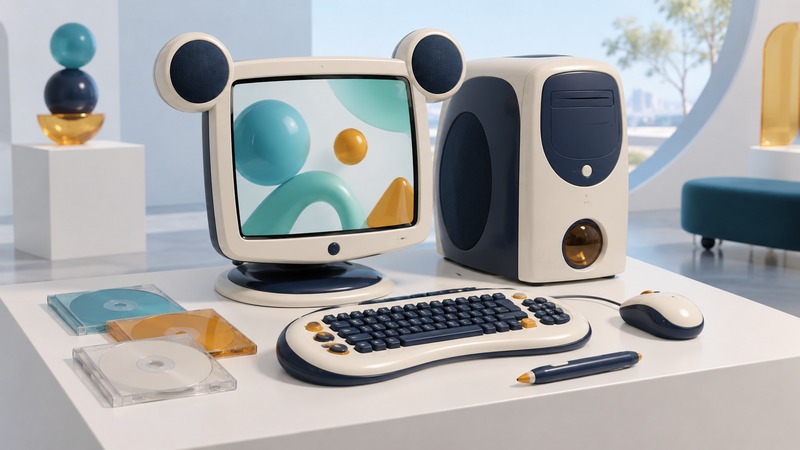
The Disney Dream Desk PC is a distinctive example of a family computer designed as a coordinated creative environment. For a collector, the useful questions are which original pieces survive, which functions can be demonstrated, and how to preserve the machine's history without losing its files or configuration.
A computer built around a child's creative workspace
Disney unveiled the Dream Desk PC on August 5, 2004. Its original launch record credits Disney and frog design with the design and Medion with manufacturing. The 14.1-inch LCD had the familiar rounded-ear silhouette and integrated speakers; the coordinated peripherals included a multimedia keyboard, a small mouse, and a digital pen.
The launch described Windows XP Home, a Celeron D 330 processor, and the Flix, Pix, and Mix creative applications. The tower and monitor were priced separately at $599 and $299 MSRP. Those are historical launch prices. Cameras, a game controller, and a printer were offered separately, so a surviving collection should distinguish the base setup from optional accessories.
The design invites a useful museum question: how did the physical workspace encourage particular activities? A pen suggests drawing and editing, dedicated media controls suggest creative play, and a coordinated display and enclosure give the desk a recognizable identity. A collector can document those relationships even when every original service or application is no longer available.
Inventory the collection before testing it
Photograph the front, rear, underside labels, connectors, packaging, and included media. Record identifiers exactly as printed. Compare the launch description with the pieces in hand, then use model-specific documentation to identify replacements. Color and styling can suggest a match; a part number and a documented connection provide stronger evidence.
Scroll the table horizontally. Keyboard users can focus it and use the arrow keys.
| Group | Record | Useful distinction |
|---|---|---|
| Computer and display | Labels, case condition, stands, speakers, cables, and power equipment | Original-looking exterior versus identified and functional hardware |
| Input devices | Keyboard, mouse, pen, connectors, and any replacement items | A visually complete desk versus a working creative-input setup |
| Software and media | Disc labels, manuals, installed applications, licenses, and recovery materials | An installed application versus a documented way to recover it |
| Optional accessories | Accessory identity, provenance, and required cables or software | An additional purchase versus part of the base package |
Give each item separate fields for present, identified, and tested. A monitor can be present and identified while its function remains untested. This prevents an attractive photograph from becoming an unsupported claim of completeness.
Preserve the record before changing the installation
- Document the received state. Note who supplied the machine, what they know about repairs, and which components appear to have been replaced. Keep private owner information separate from public exhibit notes.
- Assess power equipment and physical condition. Have damaged cords, suspect power supplies, or signs of leakage assessed by a qualified technician before energizing the system. Avoid opening mains-powered equipment as part of a collector inspection.
- Plan the storage copy. If the system contains irreplaceable material, use a competent preservation or data-recovery service before repeated startup attempts. A disk image preserves more of an installation than copying visible documents alone.
- Keep an untouched copy and a working copy. Record the copying method, date, tool, and verification result. Work on a duplicate where practical, and retain a clear log of changes.
- Demonstrate one function at a time. Record boot behavior, display and audio, input devices, and creative applications separately. A failed application is a specific finding to investigate.
For readable discs, How Long CDs and DVDs Last explains copying and verification. Preserve packaging and labels alongside the files; they help identify editions and explain what the owner actually received.
Plan an offline demonstration
Microsoft records that Windows XP support ended on April 8, 2014. Keep a historical installation separate from everyday browsing, email, and account sign-ins. Original filtering software and online offers are artifacts of their period, with present-day availability and protection requiring separate verification.
Download the Dream Desk collector inventory (plain text). It includes provenance, completeness, preservation, and demonstration fields. For a different part of computing design history, read Andy Bechtolsheim's workstation and networking career.