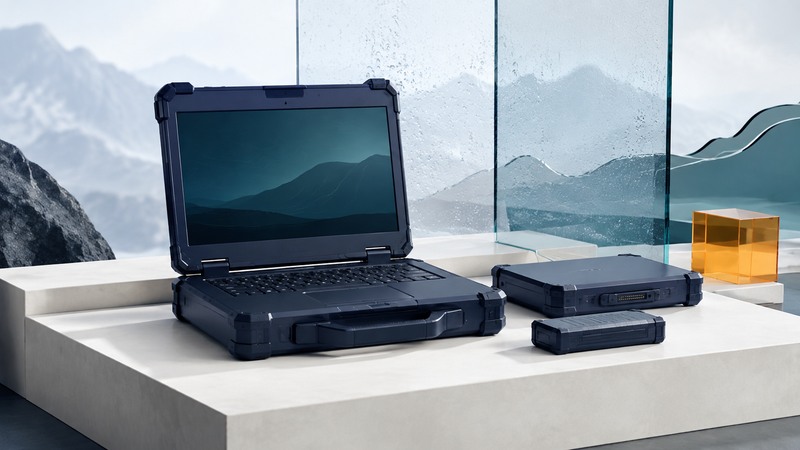
Choose a rugged laptop by matching its documented capabilities to the work environment. Start with the task, the exposures, and the consequences of downtime. Then examine the exact model's test evidence, operating instructions, accessories, and service support.
This guide helps field workers and purchasing teams build a short requirements list and conduct a practical acceptance trial. It does not prescribe laboratory abuse tests. Environmental qualification belongs with appropriate equipment, procedures, and qualified testing organizations.
Describe a working day before comparing ratings
Write a short scenario: where the computer travels, where it is operated, who carries it, what gloves are worn, what equipment connects to it, and how it is charged. Distinguish use outdoors from use inside a vehicle or sheltered building. Describe how data is saved when connectivity disappears.
Record temperature ranges as operating, storage, or charging requirements. A laptop stored in a hot vehicle and then carried into an office experiences different conditions from a laptop that must operate outdoors throughout a shift. Obtain the manufacturer's instructions for transitions, condensation, charging, and recovery after exposure.
Prioritize requirements as essential, useful, or optional. If a diagnostic interface is essential, a machine without a supported connection fails the shortlist even if its enclosure has a higher ingress rating.
Read test claims as specific evidence
The official DLA record for MIL-STD-810 describes an environmental tailoring process based on the equipment's expected lifecycle. A “MIL-STD tested” statement becomes useful when accompanied by the edition, methods, procedures, conditions, sample configuration, and pass criteria used. Ask which tests apply to the model and configuration being quoted.
IEC 60529 defines enclosure ingress-protection classification. Its IP code addresses protection against access/solid foreign objects and water through separate characters. Assess the claimed test conditions and the enclosure state, including covers and attached accessories. Ingress protection and drop resistance answer different questions.
On a narrow screen, scroll the table sideways. Keyboard: focus the table and use the arrow keys.
| Claim or requirement | Evidence to request | Practical implication |
|---|---|---|
| Drop resistance | Height, surface, orientations, operating state, samples, and damage/function criteria | The tested configuration must be relevant to how the machine is carried |
| Water or dust protection | Exact IP designation, report, required port-cover positions, and maintenance instructions | Open connections or worn seals may change the intended protection |
| Temperature range | Separate operation, storage, charging, and transition limits | A storage number alone leaves powered operation unverified |
| Outdoor-readable display | Panel option and viewing evidence in relevant lighting | Brightness, reflections, viewing angle, and user vision act together |
| Full-shift battery use | Workload, brightness, radios, battery condition, and test method | A headline runtime needs a representative workload trial |
| Vehicle docking | Supported laptop/dock combination, power and antenna requirements, installation instructions | Mechanical fit is only one part of a supported installation |
Use the rugged-laptop evaluation worksheet to record evidence, unresolved questions, and trial results. The worksheet is a purchasing aid; it confers no certification or operating approval.
Evaluate the system around the laptop
Test your real application with the exact peripheral, cable, driver, and OS version. A legacy connector can be valuable, while a supported adapter may also work; verify the actual protocol and application behavior. Include scanners, diagnostic interfaces, smart-card readers, and any required external display.
For gloves or wet conditions, evaluate the specific input mode described by the manufacturer within permitted use. Confirm that users can select small controls, enter a password, correct a mistake, and save a job. A screen that looks clear may still be difficult to operate with the required equipment.
Ask how batteries are replaced and whether the supported procedure permits replacement without stopping work. Record which battery, charger, and dock are included in the quote. Weight comparisons should include those items and the carrying arrangement, not just a bare chassis.
Plan updates, encryption, recovery information, and lost-device response with the organization's IT staff. Physical durability helps keep a computer working; data access and recovery require their own documented controls.
Run a representative acceptance trial
Use loan equipment or a trial arrangement where possible. Stay within the manufacturer's operating instructions. Assign several representative tasks and define success in advance: completing the work order, saving records while offline, reconnecting without duplicate entries, reading the screen at the intended location, and finishing the required work period with an agreed reserve.
Record the actual configuration, battery condition, screen setting, radios, workload, ambient conditions, and elapsed time. Repeat important tasks with more than one user so training issues can be distinguished from interface limitations. Record failures and the steps needed to recover.
Worked example — fictional field trial: A team needs six hours of intermittent inspections. One candidate finishes the workflow with 25% reported charge remaining, while a second requires a planned battery change after four hours. Neither result alone establishes the better choice. Check whether the second device's supported change procedure fits the work, whether spare batteries are included, and whether the first device remains adequate as its battery ages. Repeat under other representative conditions before deciding.
Keep screenshots or sample outputs from the application where they contain no sensitive customer information. A reproducible job that fails is more useful to the supplier than a general report that the laptop felt slow.
Include service and downtime in the decision
Compare warranty scope, accidental-damage terms, turnaround commitments, local support, spare availability, and reimaging procedures. Treat promised service levels according to the written terms. An environmental test result and a warranty answer different questions.
For an illustrative comparison, a $600 purchase premium spread over a planned four-year service period is $150 per year before financing, repair, or resale effects. Compare that amount with your own documented downtime and support costs. The calculation frames the decision; it supplies no assumed reliability advantage.
Retain the quote, model identifiers, test references, accessory list, and acceptance record. Revisit the decision when your application, operating environment, peripherals, or support arrangement changes. This evidence is a stronger basis for the next purchase than an old award or a brand-wide durability claim.