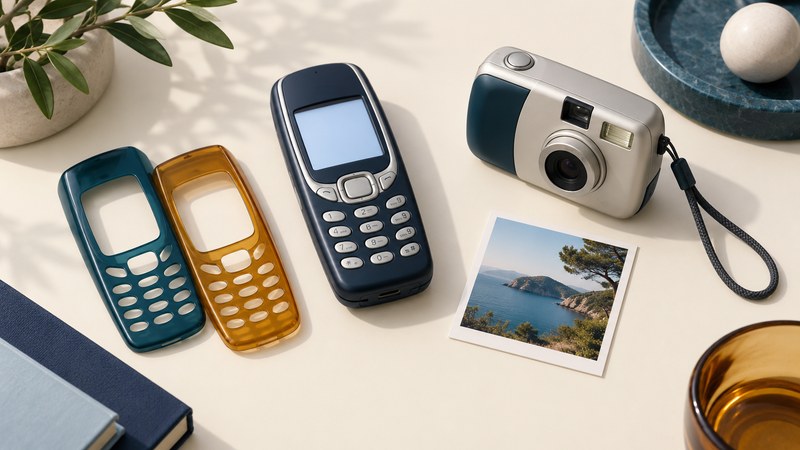
The Nokia 3100 shows how much of an early mobile phone's personality could live outside the handset. Covers changed its appearance, an active cover added lighting effects, and a separate camera supplied photographs. To understand a surviving phone or an old advertisement, first separate the base device from the accessories shown beside it.
Start with the handset, then identify each addition
Nokia's June 2003 introduction describes a color-screen phone with Java games, MMS, changeable covers, and a Pop-Port accessory connector. It presents the Fun Camera and radio headset as complementary accessories. A picture in a phone's gallery therefore does not establish that the phone itself contains a camera.
Compare the Nokia 3220’s optional Fun Shell and light messaging with Sanyo-era factory colors and fitted accessories to see why each type of personalization needs its own identification.
The same announcement describes a separately sold gaming cover with electroluminescent effects. Decorative translucent or glow-effect trim and electrically driven cover lights are different features. A shell's color alone cannot tell you which version is present. Look for its identification and the documentation for that cover.
| Object | Role | Useful evidence to record |
|---|---|---|
| Handset | Controls, display, storage, and phone functions. | Model label and the functions actually demonstrated. |
| Replacement shell | Changes the phone's exterior. | Cover identification, fit, finish, and condition. |
| Active cover | Adds powered lighting effects. | Accessory identity and an observed response, not just a colorful photograph. |
| Fun Camera PT-3 | Captures images independently, then transfers them. | The camera itself and a successful saved-image transfer. |
The Nokia-authored 3100 user guide lists the PT-3 and active covers among enhancements. Its tone settings show the cover-light option only when an active cover is attached. Use that as an intended-behavior reference, while documenting separately what your particular combination does.
The Fun Camera captured first and connected afterward
The Nokia Fun Camera PT-3 manual, pages 4–9 documents a standalone camera powered by two AAA batteries, with 640 × 480 JPEG capture. Crucially, it must be disconnected from the phone while taking pictures. It was not a lens module that used the handset as a live viewfinder.
- Capture separately. Frame the subject through the camera's viewfinder and take the photograph.
- Connect for transfer. With both devices powered on, connect the camera to a compatible phone's Pop-Port. Copying starts automatically, newest image first.
- Save and check. Save received pictures on the phone so they remain available for later viewing. The manual says copies remain in camera memory after transfer.
- Treat sharing as another step. Opening the saved image locally and sending it through a messaging service are separate outcomes.
Transfer can stop when the handset's memory is full. Before deleting anything to make room, check which device holds the only copy and preserve it. A camera that contains photographs and a phone that can display photographs may still need a working connection between them.
The 3100 name covered different radio configurations
The Nokia user guide identifies the 3100 / RH-19 for GSM 900, 1800, and 1900, and the 3100b / RH-50 for GSM 850, 1800, and 1900. These are two tri-band configurations, not four bands in every phone. The model/type information is on the handset label under the battery.
This explains why a European launch description and a North American description can name different bands without describing the same hardware configuration. Match a specification to the full model and type, not merely the large family name on a sales listing. Historical band support also does not establish that a present-day service will accept a handset.
Build a record that keeps the pieces distinct
For a collection, record the handset model, shell, camera, headset, cables, and paperwork on separate lines. Photograph identifying labels privately; avoid publishing the complete device identifier. Mark each item as present, absent, or unverified, and distinguish “documented compatible” from “tested together.”
For example, a box containing a handset and two shells is a useful surviving set even when its original camera is missing. Calling it “complete” would require an identified package specification. Adding an accessory later should be recorded as an addition, so a future reader can understand the set's history.
The 3100's accessories also belong to their own product family. A similar Nokia name or a similar-looking shell is not enough to establish interchangeability. The durable lesson is to read an accessory ecosystem as a set of documented relationships rather than one undifferentiated feature list.