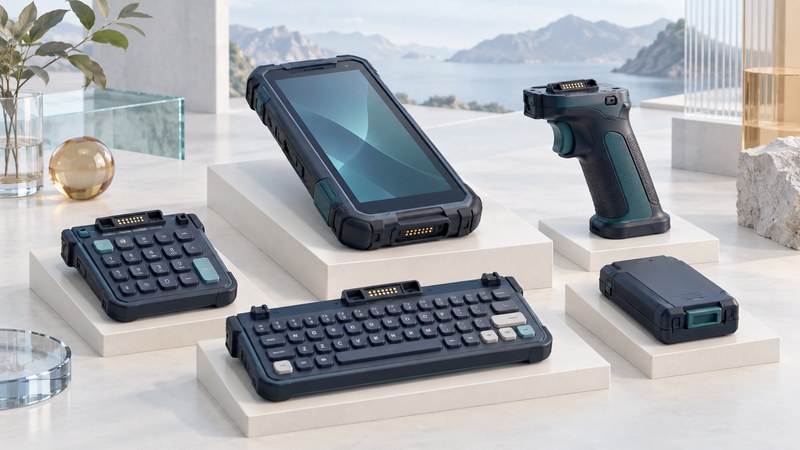
A modular mobile computer can change a task-specific component while retaining the useful core of the device. That can help a fleet share equipment or replace a failed keypad. Its value depends on supported combinations, replacement time, spare availability and the length of time the complete system remains usable.
Identify what can actually change
The Intermec CN30, introduced in 2005, used a common computing console with different keypad modules. The Intermec CN30 manufacturer manual preserved with its FCC filing describes 14-key and 56-key configurations. It also documents different battery arrangements in those modules. The engineering lesson is useful: a change in input hardware can alter power, size and maintenance requirements too.
Separate three kinds of flexibility when reading a product proposal. A configuration option may be chosen only when the device is ordered. A replaceable module has a documented replacement procedure and supported parts. An attachable accessory, such as a handle or sled, may add a function while leaving the core assembly intact. Ask who may perform each change, what tools are required, and which software settings must change afterward.
A manufacturer’s repair instructions provide better evidence than an interchangeable-looking connector. For example, Zebra’s MC9300 support page includes keypad-replacement resources. It also identifies the product’s end-of-sale and service horizon. Those are separate questions: a replaceable part can be useful during the supported life of a device without making that life indefinite.
Build a compatibility matrix before counting savings
Record part numbers and revisions, not just marketing family names. Use the manufacturer’s current configuration guide, such as the MC9300 configuration and accessories guide, as the model for the evidence you need. Confirm any planned cross-generation reuse explicitly with the supplier.
Scroll the table horizontally to see every column. Keyboard users can focus the table region and use the arrow keys.
| Component | Evidence to record | Operational check |
|---|---|---|
| Keypad or input module | Part number, supported device revision, replacement procedure and key mapping. | Can the worker enter every required identifier and shortcut? |
| Scanner, reader or trigger handle | Supported assembly, scan engine or reader, application interface and firmware. | Does the trigger perform the expected action in the production app? |
| Battery | Approved battery and charging equipment; documented power-down or swap behavior. | Does the change preserve the required task state under that procedure? |
| Dock, boot or case | Clearance and charging support with the chosen modules installed. | Can staff dock the actual assembled device without removing needed parts? |
| Complete assembly | Applicable environmental ratings, service terms and software support. | Does this configuration meet the job’s requirements and support period? |
Inspect the documented treatment of seals, fasteners and connector wear. Follow the manufacturer’s service procedure; a removable component does not imply a powered hot swap or permission for field repair. Ask whether a replacement changes an environmental rating or requires a service-center inspection.
A shared spare pool helps only if the spare fits the devices likely to fail at the same time. List which sites hold each part, how quickly it can reach a worker and what substitutes remain usable. Keep a complete spare device where a module replacement cannot restore service quickly enough. The rugged handheld selection guide provides the wider environmental and support checks.
Compare the complete cost over a defined period
Use a fixed deployment size and horizon, and include the same cost categories for both options. Count purchase premiums, spare inventory, tools, training, technician time, service charges and unproductive time. Avoid counting downtime twice if a service-contract figure already includes it. Use supplier quotations and your own incident records when available.
These invented dollar amounts are nominal USD planning inputs, not prices or a forecast. The example counts initial spare stock as inventory and each replacement part as consumption or replenishment. It assigns no residual value to remaining stock and omits financing, tax and costs equal in both options. Adapt those assumptions to your accounting method. A broken display or an obsolete operating system is outside the qualifying keypad-failure count.
Run the comparison with fewer failures, longer replacement time and shorter support life. If a whole-device spare already removes most downtime, reduce that benefit in the modular case. A modest cost premium may still be worthwhile for a documented operational requirement, but state that requirement separately from claimed savings.
Test a replacement from fault to usable transaction
- Choose a representative device, approved replacement module and normal worker task. Save the task state using the documented process.
- Have the person who would perform the work follow the service instructions with the actual tools. Time the entire interruption, including travel to spares and software setup.
- Check every changed key or trigger, charging, docking and application mapping. Reopen the job and confirm the business system received the correct test transaction.
- Record damaged fasteners, ambiguous instructions, lost settings and extra parts needed. Repeat with another supported configuration before scaling the process.
- Assign ownership of the spare list, service records and compatibility matrix. Recheck them when hardware or firmware revisions change.
Use the industrial handheld workflow guide to validate the transaction after the hardware change. A repaired trigger that produces the wrong field entry has yet to restore the worker’s task.
Download the modularity cost and replacement worksheet. It contains the worked example, assumptions and a blank comparison. The example is a calculation exercise; no device replacement or fleet trial was performed for this article.
Explore handheld computing
Handheld computers: work devices, accessories and classic PDAs