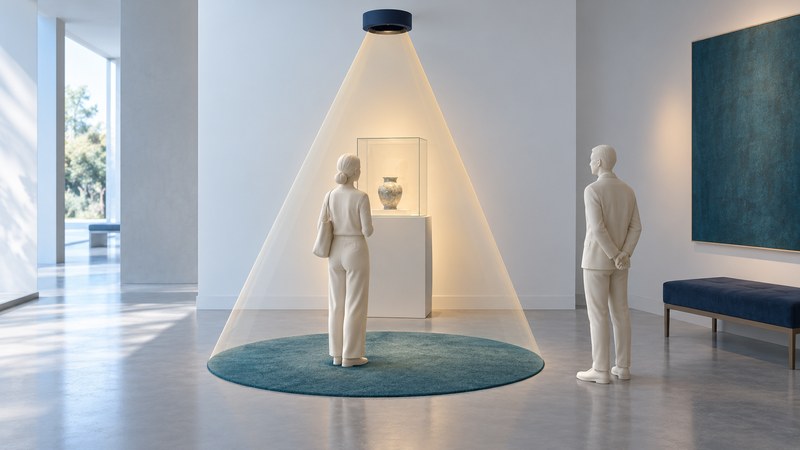
Directional ultrasonic audio creates an audible listening region by projecting a carefully shaped ultrasonic signal into the air. It can make a museum exhibit or kiosk easier to hear locally, but the room, surfaces and listener positions determine how well the sound stays where you want it.
HyperSonic Sound is associated with inventor Woody Norris, whose work was recognized by the 2005 Lemelson-MIT Prize. The broader engineering topic is often called a parametric loudspeaker. Different manufacturers use their own transducers, signal processing and product names.
Follow the signal from the panel to the listener
- Prepare the audio. Signal processing encodes the desired program into an ultrasonic waveform and compensates for the conversion process.
- Project ultrasound. A transducer panel emits wavelengths short enough, relative to the panel, to form a narrow beam.
- Generate audible components in the air. Air's nonlinear response reshapes the intense ultrasonic waveform as it travels. This produces lower-frequency components corresponding to the intended audio.
- Listen within the resulting field. Position, distance, aim and reflections affect the level and intelligibility a person hears.
Holosonics explains this principle in its technical overview of directional sound. Its Audio Spotlight is a different commercial system from Norris's HyperSonic Sound. The shared physical principle is useful for understanding the category; a claim about one model's performance belongs to that model.
The light-beam analogy helps describe aim and reflections. Audible sound still reaches ears through the surrounding air. There is no need to imagine a message generated inside the listener's head, and the edge of the useful listening area is gradual rather than a soundproof wall.
The installation includes the room
A quiet demonstration in an empty room answers only a small part of the installation question. A glass display case, hard floor or nearby wall can redirect energy. People also change the field as they move through it. The Audio Spotlight user's manual, in its installation and reflections sections, discusses aiming and absorbing surfaces, including deliberately using reflections to create a virtual source.
That gives an installer two distinct tasks: make the intended content understandable in the desired area, and assess what can be heard elsewhere. A listening test can reveal distracting spill or reflected speech. Product documentation and a qualified installation assessment are needed for exposure and compliance questions; how quiet a system seems is an incomplete measure of its ultrasonic output.
On a narrow screen, focus the table region and use the arrow keys or swipe to read all columns.
| Need | What to test | Why it changes the choice |
|---|---|---|
| One person at a kiosk | Speech clarity at realistic head positions and heights. | A very narrow zone can be inconvenient if visitors naturally stand elsewhere. |
| Two adjacent exhibits | Each program alone, then both together, including reflected paths. | The combined listening experience can differ from either demonstration alone. |
| A music presentation | The actual material at the intended level. | Speech intelligibility and satisfying musical reproduction are different requirements. |
| Confidential content | Audibility at unintended positions and through likely reflections. | A localized speaker should not be treated as a confidentiality guarantee. |
Run a repeatable listening check
Use the proposed equipment with its intended mounting, following the manufacturer's setup instructions. Choose a short recording representative of the final content, including quiet speech and pauses. Keep the source file and settings fixed while comparing positions.
- Sketch the room and mark the intended listening position, neighboring exhibits, staff desks and hard surfaces.
- Record the panel location, aim, mounting height, model and playback setting.
- Check comprehension at the intended spot at seated and standing ear heights, with willing listeners who reflect likely visitors.
- Move through the boundary and nearby circulation routes. Record whether speech is understandable, merely audible or absent to that listener.
- Repeat with normal background sound and typical occupancy. Test adjacent programs simultaneously if they will run together.
- Change one variable, such as aim or an approved absorbing treatment, then repeat the same route and recording.
Agree on an acceptance criterion in advance. For example, a museum might require that a visitor at a particular exhibit can repeat the key instruction while a nearby reading area remains undistracted. Record that as the project's criterion, not a universal acoustic standard. An accessible transcript or captioned alternative also serves visitors who cannot use the audio presentation.
Example: a display case changes the result
Download the directional-audio listening checklist. It includes a position log and a place to record unresolved accessibility, manufacturer-documentation and installation questions. Revisit the test after changing the exhibit, furnishings, program or speaker settings.