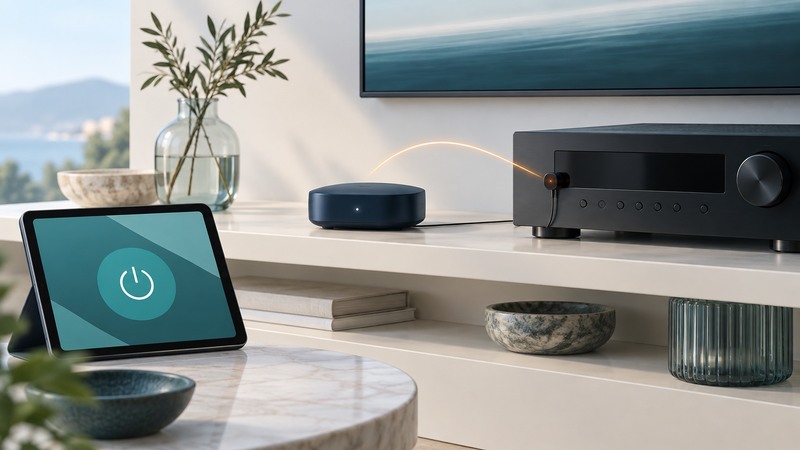
A Wi-Fi-to-IR or serial bridge carries commands from a network client to equipment with an older control interface. Reliable control requires agreement on the command format, careful handling of retries, and evidence of what the equipment actually did.
This guide uses ordinary audio/video equipment as its bench context. You need the exact device's control documentation, a compatible bridge, its API manual and a way to observe the device. Begin with a harmless, reversible command such as selecting a known input.
Choose IR or serial from the equipment
An IR bridge emits a coded light sequence that the appliance's receiver recognizes. Confirm the model's code set, carrier/timing requirements and emitter arrangement using the bridge and appliance documentation. Place an approved emitter where the receiver can see it; a successful network connection says little about that optical path.
A serial bridge carries a device's documented serial protocol. Establish the electrical interface first: RS-232, RS-485 and logic-level UART require appropriate hardware. Then match connector pinout, baud rate, data bits, parity, stop bits, flow control and command terminators to the device manual. Similar-looking connectors can serve different signals.
As a scoped historical API example, Global Caché's iTach API v1.5, effective August 25, 2011, documents its IR command exchange and bidirectional RS-232 behavior. Use the API and firmware documentation for the actual bridge family; command syntax from one family can differ from another.
Separate the acknowledgments
Scroll the table horizontally; keyboard users can focus it and use the arrow keys.
| Observation | What it establishes | Next check |
|---|---|---|
| Network request accepted | The client reached the bridge and its request was accepted at that layer. | Check the bridge's command result and error response. |
| IR transmission completed | The bridge reports completing the requested IR output. | Observe the appliance or use a separate state-feedback mechanism. |
| Appliance state confirmed | A documented state reply or direct observation matches the requested result. | Record the state, time and confirmation method. |
For iTach IR, the completeir response belongs to the bridge's transmission exchange. Global Caché's IR-code testing instructions also call for checking the equipment's reaction. Preserve both observations in a test record.
Prefer commands with predictable repetition
A discrete “select input 2” command has a target state. A toggle command changes the current state. If an acknowledgment is lost and the client repeats a toggle, the second command can undo the first. That difference determines retry policy.
Fictional AV test: the receiver begins on input 1. A documented discrete command selects input 2. The bridge reports completion, and the tester visually confirms input 2. The tester repeats the same command once and confirms it remains on input 2. The same repeat test with a power toggle would have a different result, so the controller must treat it as a separate command class.
Use a command identifier in the client log even if the bridge protocol uses a different identifier. Record whether a timeout means “known failed” or “outcome unknown.” For an unknown toggle outcome, refresh actual state or request a user check before deciding what to send next.
Build a short, observable sequence
- Confirm direct control works using the appliance's original remote or documented local interface.
- Send one command through the bridge. Save the exact request, response, elapsed time and device observation.
- For serial control, start with a documented status query if available. Compare the raw reply, its terminator and the parsed state.
- Test a supported discrete action, then its documented state query or visual confirmation.
- Introduce the next command only after the first one's completion condition is understood. Use documented readiness feedback or measured, bounded delays where feedback is unavailable.
- Test bridge restart and network interruption on the bench. Confirm queued commands and retries behave as designed.
A fixed delay can accommodate known equipment behavior, but it cannot prove the requested state occurred. Record that limitation in the interface: for example, display “command sent” until a state query or user observation confirms the result.
Diagnose the failing boundary
Bridge unreachable: check its assigned address, network membership and permitted client path. Keep control endpoints available only to intended users and systems.
Bridge accepts IR but appliance is unchanged: check the exact code, emitter placement, receiver visibility and whether the command makes sense in the appliance's present state.
Serial reply unreadable or absent: recheck electrical compatibility, pinout, settings, terminator and whether the command is a query that should produce a reply. Capture raw bytes before changing the parser.
Use the control-command log to keep transmission evidence separate from device-state evidence. If an approved client cannot reach the bridge at all, trace that connection with the wireless firewall guide.