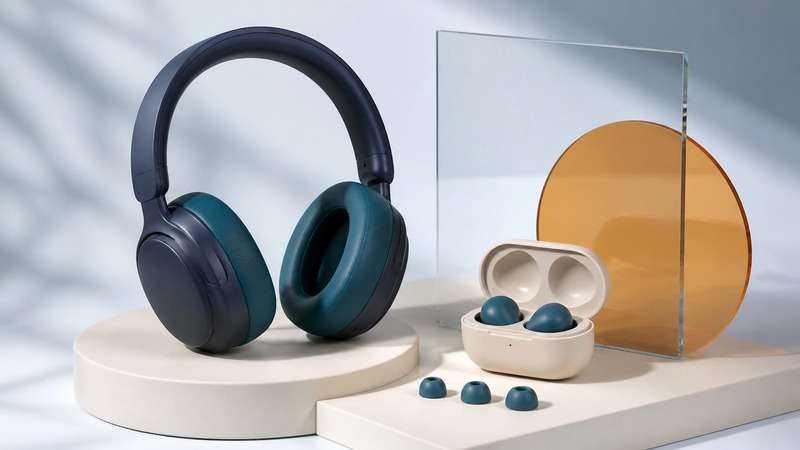
Good wireless headphones should make your usual music easy to enjoy on the devices you actually use. Start with fit, controls, and reliable playback. Then investigate the connection features that matter to your routine. A long codec list cannot tell you whether the ear cushions press on your glasses or whether switching from your laptop to your phone interrupts a song.
Fit changes both comfort and sound
For earbuds, try the supplied tip sizes in each ear; the best sizes may differ. A loose seal can make bass seem thin and let outside sound compete with the music. For over-ear models, check cushion contact around your ears, headband pressure, and the effect of glasses. Listen while sitting, turning your head, and walking in a safe indoor space. A comfortable first minute is useful information, but a longer ordinary listening session reveals pressure and heat that a quick audition misses.
Passive isolation comes from the physical barrier around or in the ear. Active noise cancellation, or ANC, adds electronically generated sound to reduce some incoming noise. It does not create complete silence. Sony's explanation of noise cancellation describes greater effectiveness against low-frequency noise such as vehicle and air-conditioning sound, and the importance of proper fit. Use this distinction when comparing steady room hum with nearby speech; one successful test does not establish the other.
Compare ANC on and off without increasing the volume to overpower the room. Transparency or ambient mode has a different purpose: letting you hear more of the surroundings. Check whether its sound feels natural enough for your needs. Neither mode should be judged solely by how dramatically it changes the noise when first activated.
Listening exposure depends on level and duration together. Keep the volume comfortable, take breaks, and use exposure monitoring where your device supports it. Well-fitting headphones with effective isolation or cancellation can reduce the urge to turn music up in noise. The WHO's safe-listening guidance explains this relationship; a volume-slider position alone is not a measurement of sound at your ears.
Check the whole connection, not just the headphone box
A codec is a method of encoding and decoding audio. The source device and headphones need compatible support, and the mode actually used can depend on settings and operating conditions. Look up the exact phone or computer as well as the exact headphones. The Bluetooth version number alone is not a complete audio feature list. The Bluetooth SIG's LE Audio specification overview describes a family of audio capabilities and specifications; confirm the advertised feature on both ends instead of assuming every Bluetooth device implements it.
Also separate the music file from its transmission. A lossless streaming subscription does not by itself guarantee a lossless wireless path. Apple's lossless-audio support guide distinguishes ordinary Bluetooth playback from its supported wired and specific proprietary wireless arrangements. Other systems have their own requirements: Qualcomm lists selected products with aptX Lossless support. Verify the compatible source, headphones, and required mode before treating a logo as an end-to-end promise. Lossless describes preservation of audio data, not comfort, tuning, or a guarantee that you will prefer the sound.
On a small screen, scroll the table sideways to read all columns.
| Feature | Useful for | Check before relying on it |
|---|---|---|
| Bluetooth playback | Everyday listening without a cable. | Pair with your actual source and test range, interruptions, and controls. |
| Multipoint | Moving between a phone and computer. | Test device switching and incoming calls; do not assume simultaneous mixing. |
| Analog cable input | A wired fallback or monitoring path. | Confirm the jack, required cable, power requirements, and available processing. |
| USB audio | A digital wired path where explicitly supported. | Confirm audio support; a charging socket alone does not establish it. |
| Low-delay wireless mode | Interactive uses on compatible systems. | Test playing an instrument; a synchronized video is a different test. |
Multipoint usually helps you stay connected to two devices and switch between them. Do not assume it mixes two soundtracks. For example, Sony's WH-1000XM5 multipoint instructions describe switching playback and receiving calls across two connections. Test your own laptop-and-phone combination, including what happens when a notification or call arrives.
A cable can be a useful fallback, but inspect what the sockets actually do. A USB-C charging port is not necessarily a USB audio input. Sony's WH-1000XM5 parts guide, for instance, identifies separate USB-C charging and headphone-cable connections. If a model supports analog listening, check whether it works with an empty battery and which processing features require power. Read the manual for that model rather than extending one product's behavior to every wireless headset.
Run a repeatable listening comparison
Use the headphone comparison worksheet (CSV) to record observations. Its first row is an explicitly invented example, followed by blank rows. It is a listening log, not laboratory measurement or a ranked buying list.
- Choose familiar material. Use one passage with a clear voice, another with bass and drums, and a quieter passage where room noise could mask detail. Keep the exact timestamps so you can repeat the comparison.
- Check the source settings. Record the device, app, connection, equalizer, and ANC mode. Start with optional sound enhancements off so you know what you are comparing.
- Match comfortable loudness by ear. The same numerical volume setting can produce different levels on different headphones. Adjust each to a similar, modest perceived loudness. This is an informal comparison, not a calibrated test.
- Write specific observations. “Voice becomes hard to follow when the bass enters” is more useful than “bad clarity.” Note pressure, seal changes, controls, interruptions, and whether you keep wanting to adjust the fit.
- Repeat the relevant daily task. Switch devices, walk to the next room, or make a brief call with consent from the other participant. Music playback quality does not establish microphone quality.
Keep preference and function separate. You may like a stronger bass balance but still need a more comfortable headband for long sessions. A small equalizer adjustment can change tonal balance; it cannot repair an unreliable connection or an uncomfortable shape. Do not turn a short audition into a claim that one headphone is universally more accurate.
Diagnose the symptom before changing equipment
Thin sound: recheck the seal and fit before changing codecs or adding bass boost. Compare with sound enhancements disabled. If one ear differs, inspect the tip or cushion and follow the manufacturer's cleaning instructions.
Music becomes different when a call starts: check the computer's selected playback and microphone devices. Test again after closing the calling app. Using the headset microphone can change the available audio path; the behavior depends on the headset, Bluetooth support, and operating system.
A keyboard or guitar feels late: test wired monitoring. Listening to finished music can tolerate transport delay that is distracting when you hear every note after playing it. Video applications may compensate for delay, so a well-synchronized film does not establish suitability for live instrument monitoring. See our guitar modeling and monitoring guide for the distinction between one audio buffer and total delay.
Playback keeps switching: disconnect the second multipoint device and repeat the test. If the interruption disappears, investigate its notifications, calls, and playback apps before resetting everything. Record what changed so a successful fix is reproducible.
Earlier headphone reporting
These linked pages describe older products and announcements. They provide historical context, rather than current availability or buying advice: an earlier noise-cancelling headphone announcement, waterproof headphone reporting, and surround-sound headphone reporting.
Related resources
- Create a track and check its exported audio
- Prepare a microphone and wired headphones for practice assessment
- Explore all music resources
Researched and updated September 6, 2026. Sources are linked beside the relevant information. Product examples illustrate specific workflows; they are not rankings.