 Virtual reality has evolved from specialized rooms and tethered engineering displays into a broad computing medium. A modern headset may map a room, track hands and eyes, render a different high-resolution image for each eye, reconstruct the outside world through cameras and place persistent digital objects into that space—all while operating from a wearable computer.
The field now overlaps with augmented reality, mixed reality and spatial computing. The terminology is fluid, but the underlying design question is consistent: how much of the physical world should a system preserve, replace or understand? The most useful experiences choose the appropriate degree of immersion rather than treating complete visual isolation as the goal.
VR, AR, mixed reality and spatial computing
| Approach | What the user sees | Typical strength |
|---|---|---|
| Virtual reality | A computer-generated environment replacing the surrounding view | Presence, simulation, games, rehearsal and distraction-free visualization |
| Augmented reality | Digital information overlaid on a direct or camera-mediated view | Guidance and context while preserving the real task |
| Mixed reality | Digital objects registered to and interacting with mapped physical space | Spatial work, design review and blended entertainment |
| Spatial computing | Windows, media and 3D content organized around the user and environment | General-purpose computing beyond a flat screen |
| Extended reality (XR) | An umbrella term encompassing VR, AR and related systems | Discussing the shared technology and industry |
Optical see-through AR passes real light through transparent optics, so the outside world remains naturally sharp but virtual imagery must compete with ambient brightness. Video-passthrough mixed reality captures the environment with cameras and displays the composited result on opaque screens. Passthrough offers stronger occlusion and visual control, but introduces camera noise, distortion and latency. Neither architecture is universally superior.
Displays and optics
Head-mounted displays need high pixel density, rapid refresh, low persistence and precise synchronization. LCD panels remain cost-effective; OLED and micro-OLED can provide deeper black, high contrast and compact pixels. MicroLED promises exceptional brightness and efficiency for future transparent and compact displays, but manufacturing full-color, high-resolution panels at scale remains difficult.
Fresnel lenses made early consumer headsets affordable but create glare, concentric artifacts and a limited clarity zone. Folded “pancake” optics use polarization to shorten the light path and produce slimmer headsets with clearer edge-to-edge viewing, at the cost of optical efficiency. Optical see-through glasses may use waveguides to route light from a small projector into the eye. Waveguide efficiency, color uniformity, field of view and outdoor brightness remain central engineering tradeoffs.
Resolution alone does not determine image quality. Pixels per degree better describes angular detail, while field of view affects peripheral immersion. Lens quality, subpixel arrangement, binocular overlap, contrast, motion-to-photon latency and calibration matter. Vergence-accommodation conflict persists because the eyes converge on simulated depths while focusing at a fixed display plane. Varifocal, multifocal and light-field systems seek to supply more correct focus cues, but add complexity.
Tracking the wearer and the world
Six-degree-of-freedom tracking measures position and rotation. Earlier systems relied on external cameras or laser base stations. Current standalone headsets commonly use inside-out visual-inertial tracking: cameras observe features in the room while inertial sensors measure rapid motion, and simultaneous localization and mapping estimates the headset's pose and surrounding geometry.
Depth cameras, structured light, time-of-flight sensors and machine vision improve room meshing, obstacle detection and object placement. Plane detection identifies walls, floors and tables; semantic understanding distinguishes objects and usable surfaces. Spatial anchors let content remain in a location across sessions, while shared coordinates allow multiple users to see a model in the same place. Accuracy can degrade in darkness, featureless rooms, reflective surfaces or rapidly changing scenes.
Controllers provide reliable buttons, triggers, thumbsticks and haptic feedback. Optical hand tracking offers direct pointing, pinching and grasping without hardware, but occlusion and the absence of physical resistance limit precision. Eye tracking supports gaze selection, social eye contact, accessibility and rendering optimization. Face and body tracking improve avatars; external cameras, wearable trackers or AI pose estimation fill gaps outside the headset cameras' view.
Rendering, latency and foveation
VR renders separate views at high frame rates while responding to every head movement. If the image arrives late or inconsistently, the visual and vestibular systems disagree. Engines use prediction, late-stage pose updates, asynchronous reprojection and time warping to reduce perceived latency. Reprojection can smooth an occasional missed frame but cannot restore animation, physics or input that was never computed.
Foveated rendering concentrates detail near the direction of gaze and reduces work in peripheral vision, reflecting the eye's highest acuity at the fovea. Fixed foveation assumes the user looks near the center; dynamic foveation follows an eye tracker. Foveated streaming similarly sends the greatest network detail where the user is looking. These techniques can increase effective fidelity, but calibration, gaze latency and privacy require care.
Standalone headsets render locally on mobile-class processors. PC and console systems offer more graphics power through a cable or low-latency wireless link. Cloud and edge rendering can deliver complex scenes to lighter clients, but motion-to-photon delay, network jitter, compression and loss make ordinary video-streaming assumptions inadequate. Hybrid systems may render nearby interaction locally while streaming expensive backgrounds or simulations.
Passthrough mixed reality
Color passthrough has changed consumer VR into a mixed-reality platform. Cameras reconstruct a stereo view, correct lens distortion and reproject the scene for the wearer's current pose. Depth sensing and hand segmentation allow virtual objects to hide behind physical furniture or respond to a real tabletop. A room can become a game board, an array of virtual monitors or the setting for a remote design review.
Passthrough is still mediated vision. Camera placement differs from the eyes, reconstruction can distort nearby hands and objects, dynamic range may clip windows or screens and latency may affect coordination. Safety-critical use requires validation of scale, depth, field of view and failure behavior. A system should make boundaries and tracking loss obvious rather than presenting uncertain geometry as exact.
Spatial sound and haptics
Spatial audio renders direction, distance, room reflections and head-related filtering so sound remains anchored as the listener turns. Personalized head-related transfer functions can improve localization. Scene-aware acoustics now estimate how surfaces absorb and reflect sound, making a virtual source behave differently in a carpeted room and a tiled hall.
Controller vibration is only the beginning of haptics. Gloves and fingertip devices create vibration, skin stretch or braking forces; vests distribute impacts across the torso; grounded arms and exoskeletons provide stronger force feedback; treadmills and foot platforms address locomotion. Ultrasonic and electrical stimulation can create touch sensations without conventional motors. Every technique balances realism, weight, calibration, safety and cost. No general wearable yet recreates unrestricted solid contact.
Interaction and interface design
Good spatial interfaces combine gaze, head pose, hands, voice and controllers rather than forcing one method everywhere. Gaze can identify a target, a pinch can confirm it and voice can supply text. Direct manipulation works for nearby objects; rays work at distance. Physical keyboards, tracked styluses and specialized tools remain valuable for precision and sustained productivity.
Interfaces should respect reach, fatigue and vision. Frequently used controls belong in a comfortable central region, not overhead or at full arm extension. Text needs stable placement, sufficient angular size and contrast. Applications should support seated and standing operation, dominant-hand choice, captions, alternative input, adjustable motion and adequate time. Spatial UI is not a collection of floating flat panels; depth should add meaning.
AI and neural technologies
Artificial intelligence is accelerating content production and runtime behavior. Photogrammetry, neural radiance fields and 3D Gaussian splatting reconstruct scenes from photographs or video. Generative systems can draft meshes, textures, animation, speech and code, while language models give characters flexible conversation and help users create worlds through instructions. Traditional tools remain essential for topology, physics, art direction, copyright review and optimization.
Runtime AI recognizes rooms, objects, gestures, speech and facial expression. Neural rendering can improve resolution, synthesize intermediate views and compress streamed imagery. Digital humans use learned animation to map voice and face signals onto avatars. These systems can fail unpredictably; professional, educational and medical uses need provenance, moderation, performance limits and an appropriate human review loop.
Entertainment, media and social presence
Games remain VR's best-known application because head and hand tracking turn aiming, climbing, rhythm, driving and flight into embodied actions. Location-based venues add large tracked spaces, props and effects that are impractical at home. Fitness programs use movement as interaction, though exercise claims require sensible calibration and health guidance.
Immersive video surrounds the viewer with stereoscopic high-resolution imagery and spatial audio. Volumetric capture reconstructs performers so viewers can change viewpoint. Spatial photographs and video preserve binocular depth with a more modest data burden. Live sports, concerts and documentaries benefit from presence, but directors must guide attention without conventional cuts that cause discomfort.
Social VR conveys gesture, gaze, voice and interpersonal distance. Face and eye tracking make avatars more expressive, while inverse kinematics estimates untracked limbs. Identity, harassment, child safety and personal boundaries require purpose-built controls. Moderation must consider voice, gesture and spatial proximity, not only text.
Engineering, manufacturing and digital twins
Engineers inspect full-scale CAD assemblies, computational-fluid-dynamics fields, factory layouts and architectural models before building them. Teams can find reach problems, sight-line failures and maintenance conflicts that are hard to perceive on a monitor. Augmented instructions guide assembly or inspection, while remote experts annotate a worker's view. Digital twins connect a 3D representation to sensor and operational data for monitoring and scenario analysis.
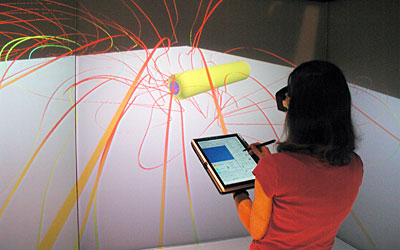
The FieldView eXtreme CFD visualization described in the original 2005 article was an early example: engineers moved simulation data from desktop tools into a tracked stereoscopic environment. The principle survives, but headsets, real-time engines and shared spatial models have made immersive engineering more accessible. Fidelity still matters: geometry revision, units, coordinate systems, simulation assumptions and data timestamps must remain visible.
| Industrial use | Value | Validation concern |
|---|---|---|
| Design review | Full-scale understanding before tooling | Accurate geometry, materials, ergonomics and revision control |
| Training | Repeatable practice without occupying equipment | Transfer to real performance and correct representation of hazards |
| Remote assistance | Specialist guidance at the point of work | Connectivity, privacy, latency and worker attention |
| Digital twin | Spatial view of live state and simulated futures | Sensor quality, model validity and time synchronization |
| Sales and configuration | Experience products and options before manufacture | Visual truth, accessibility and clear distinction from the final product |
Training and education
Simulation lets learners practice rare, expensive or dangerous situations: emergency response, aircraft procedures, industrial maintenance, laboratory work, public speaking and clinical communication. Systems can record sequence, timing, gaze and decisions for structured feedback. Multiuser scenarios teach coordination and allow instructors to change conditions.
Immersion is not automatically better learning. A simulation should match objectives, provide coaching and test transfer to the real task. High visual realism can distract from the principle being taught, and procedural training can teach the wrong motor pattern if tracking or haptics are inaccurate. Desktop, tablet or physical practice may be more appropriate when immersion adds no instructional value.
Health care and therapy
Medical XR includes surgical planning, anatomy visualization, intraoperative guidance, rehabilitation, pain distraction, exposure therapy, mental-health treatment, ophthalmic assessment and clinician training. Home-based systems may extend specialist care and measure movement consistently. A consumer wellness application and a medical device making treatment claims are not the same regulatory category.
The FDA's medical XR resources identify benefits and risks including cybersickness, head and neck strain, display or depth error, distraction, cybersecurity and privacy. Clinical evidence must support the particular device, population and outcome. Surgical overlays require registration accuracy and a safe response to tracking failure; therapy requires qualified protocols and monitoring.
Architecture, culture, retail and remote work
Architects walk clients through spaces before construction and compare lighting, materials and accessibility. Museums reconstruct sites, place objects in context and make inaccessible collections explorable. Retailers offer scale-aware product previews and virtual showrooms. Real estate, tourism and heritage use captured environments to convey place, though a digital visit should not be presented as a perfect substitute for physical accessibility.
Spatial work can surround a user with virtual displays, 3D data and remote collaborators. It is compelling for focused sessions and objects that benefit from depth. All-day replacement of monitors remains constrained by comfort, text clarity, isolation, battery life and social acceptability. Mixed-reality systems that preserve coworkers and physical keyboards may be more practical than full isolation.
Standards and development platforms
OpenXR 1.1 provides a cross-platform interface between applications and XR runtimes, reducing device-specific integration. Extensions cover capabilities such as hand tracking, eye gaze, anchors and passthrough. Khronos is also developing spatial-entity extensions for planes, markers, persistent anchors and related environment understanding. Conformance and optional-feature testing remain necessary; a common API does not make every headset capability identical.
glTF packages runtime 3D assets, OpenUSD represents composed scenes and WebXR exposes immersive experiences through compatible browsers. Unity, Unreal Engine, Godot, RealityKit and native graphics APIs offer different tradeoffs. Teams should preserve source assets and semantics, automate performance checks and design graceful fallbacks when eye tracking, depth sensing or controllers are absent.
Comfort, safety and accessibility
| Risk | Cause | Mitigation |
|---|---|---|
| Cybersickness | Visual motion conflicts with vestibular cues, latency or unstable frame rate | Teleportation, snap turning, stable references, high performance and adjustable intensity |
| Collision | Reduced awareness of walls, people, pets and furniture | Guardian boundaries, passthrough, obstacle detection and clear play-space guidance |
| Eye and neck fatigue | Poor fit, optical error, weight, extended use or unsuitable content | Correct adjustment, breaks, balanced design and age-appropriate guidance |
| Privacy loss | Collection of room maps, gaze, voice, movement and biometrics | Data minimization, on-device processing, permissions, retention limits and security |
| Exclusion | Interfaces assume standing, two hands, full vision or precise motion | Alternative input, captions, remapping, seated modes and adjustable presentation |
Motion comfort varies enormously. Artificial locomotion, acceleration and camera rotation are common triggers. Developers should offer teleport and smooth movement, snap and continuous turning, vignette options and seated calibration. Stable frame pacing matters as much as average frame rate. Users should stop when symptoms develop rather than trying to “push through.”
XR devices sense unusually intimate data: gaze can imply attention, room maps expose homes and body motion may identify individuals. Applications should request only required sensors, explain their use, favor local processing and separate social sharing from core function. Bystanders need visible capture signals and reasonable protection even when they never accepted a headset's terms.
Selecting the right system
Start with the task. Consumer entertainment favors accessible standalone hardware and a strong content library. Engineering may need a powerful workstation, precise tracking and CAD integration. Training may prioritize fleet management and hygiene. Medical or hazardous work requires evidence, controlled updates and validated failure behavior. A lightweight optical display may be better for all-day guidance; an opaque headset may be better for complete simulation.
Evaluate angular clarity, field of view, passthrough quality, tracking volume, input, comfort, prescription-lens support, battery, wireless behavior, compute requirements, software support, privacy controls, accessibility, maintainability and total deployment cost. Pilot with representative users and real tasks. Time-to-completion, error rate, retention, physical strain and transfer to real performance matter more than novelty.
Where immersive computing is heading
Headsets will continue to become thinner and more capable, but progress depends on several linked systems: efficient displays, compact optics, accurate sensing, low-power compute, batteries, thermal management and content. Eye-tracked rendering and streaming can spend resources where vision extracts the most detail. Better scene understanding will let digital objects interact more credibly with rooms, while shared anchors support durable collaborative spaces.
AI will lower the cost of creating worlds and make simulations more responsive, but trusted applications will distinguish generated material from validated source data. Open standards will reduce porting work, though business models and platform permissions will continue to shape interoperability. Haptics, varifocal optics and neural displays will advance unevenly rather than arrive as one universal breakthrough.
The strongest future for virtual reality is not escape alone. It is the ability to rehearse a dangerous task safely, understand a complex flow field spatially, collaborate around a machine that has not been built, deliver a carefully validated therapy or experience a place otherwise inaccessible. Immersion succeeds when it improves understanding or action—and fades into the background while doing so.