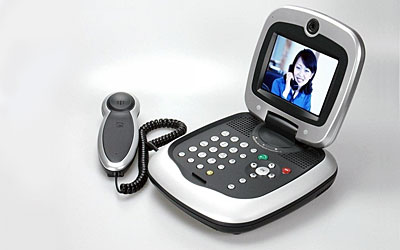
IP video phones brought an old communications dream into the broadband era: a real-time face-to-face call without a dedicated television studio, ISDN room system, or corporate videoconference suite. By using Internet Protocol networks, compression codecs, microphones, cameras, displays, and VoIP signaling, these devices made video calling feel closer to an ordinary phone call.
The 2006 Leadtek XTP8830, built with Trolltech's Qtopia software for Linux-based embedded products, was part of that transition. It used H.264 video compression, H.323 and SIP signaling, Ethernet networking, and an embedded interface designed for homes and offices. It also reflected the "triple play" language of the time, when broadband providers were trying to deliver voice, video, and Internet services over a common IP connection.
What Made IP Videophones Different
Traditional video calling depended on specialized networks, expensive conference equipment, or closed systems. IP videophones shifted the problem toward software, codecs, broadband bandwidth, and interoperability. If voice could move over IP, video could follow, provided the device could capture, compress, transmit, receive, decode, and display media quickly enough.
That change mattered because it made video calling easier to embed into everyday devices. A videophone could sit on a desk, connect to Ethernet, use familiar call controls, and reach another endpoint through enterprise systems, carrier services, or Internet-based infrastructure.
The Role of H.264
H.264 was important because it delivered better video quality at lower bitrates than earlier codecs. For a broadband videophone, that meant a more usable picture on real residential and office connections. Compression efficiency helped video calling move from a laboratory or conference-room experience toward something that could work over ordinary networks.
H.264 remains relevant in modern real-time communications, even as newer codecs such as VP9, AV1, and H.265 are used in some contexts. WebRTC-compatible browsers are expected to support both VP8 and H.264 video, which is one reason H.264 still appears in many video communication pipelines.
SIP, H.323, and Interoperability
Early IP video phones often supported H.323, SIP, or both. H.323 had deep roots in enterprise videoconferencing, while SIP became central to VoIP and session control. Supporting both gave devices a better chance of connecting across carriers, enterprise systems, and video infrastructure that did not all speak the same language.
Interoperability has always been one of the hardest parts of video calling. Cameras, codecs, firewalls, NAT traversal, call signaling, directories, quality of service, and security all have to cooperate. A device can have good hardware and still deliver a poor experience if it cannot connect reliably or maintain quality on imperfect networks.
Embedded Linux and the Appliance Model
The Leadtek device also shows how embedded Linux helped communications hardware become more flexible. Trolltech's Qtopia gave the product a customizable application platform and user interface, allowing the manufacturer to combine video telephony, VoIP, streaming, browsing, and device controls in one appliance.
This appliance model made sense in the mid-2000s. A dedicated device could control the camera, microphone, screen, network stack, user interface, and security environment. It did not depend on a general-purpose PC being configured correctly. For many users, that simplicity was the point.
Why Dedicated Videophones Did Not Become the Whole Future
Dedicated IP videophones solved real problems, but the market changed around them. Laptops gained webcams. Smartphones added front-facing cameras. Tablets became common. Collaboration platforms made video calling a software feature. Consumers got used to calling from apps rather than from special-purpose desk hardware.
The result was not the end of IP video calling, but its absorption into everything else. Video calls moved into browsers, phones, messaging apps, telehealth systems, classrooms, customer support, smart displays, doorbells, conference rooms, and enterprise collaboration suites.
WebRTC Changed the Distribution Model
WebRTC made real-time audio, video, and data available inside web browsers and applications without requiring a proprietary plugin. That changed distribution. A developer could build a video calling experience into a website, support portal, telehealth visit, education platform, or collaboration tool, and the user could join with a link.
WebRTC did not remove the hard engineering problems. Services still need signaling, media servers for group calls, NAT traversal, bandwidth adaptation, encryption, device permissions, and user experience design. But it made the browser a legitimate video endpoint, which broadened video calling far beyond dedicated hardware.
Where Hardware Still Matters
Dedicated video hardware still has a place. Desk phones with video, conference-room systems, telepresence bars, kiosks, industrial support terminals, medical carts, secure government endpoints, and customer-service stations all benefit from controlled hardware. These environments need predictable cameras, microphones, speakers, displays, management tools, and support lifecycles.
Hardware also matters when the device must be always available. A laptop can be closed, muted, updated, or borrowed. A managed video endpoint can stay in place, wake quickly, and behave consistently for many users.
Security and Emergency Considerations
IP communications depend on network security. Video phones and video apps should protect signaling, encrypt media where appropriate, receive updates, authenticate users, and avoid exposing management interfaces. A poorly managed endpoint can become a privacy risk, especially when it includes a camera and microphone.
VoIP systems also raise emergency-calling issues. Interconnected VoIP providers have obligations around 911 and registered location information in the United States, and organizations deploying IP phones must think carefully about location, power backup, network outages, and how emergency calls route when users move devices.
Quality of Experience
Video calling quality is not only resolution. It depends on audio clarity, echo cancellation, lighting, camera placement, latency, packet loss, bandwidth adaptation, user interface design, and the ease of joining a call. Bad audio can ruin a video call even when the picture looks fine.
Modern systems use adaptive bitrate, noise suppression, background processing, hardware acceleration, and network monitoring to keep calls usable. The same basic challenge existed for early IP videophones: make the technology disappear enough that people can focus on the conversation.
From Product Category to Feature
The IP broadband videophone was once a product category. Today, IP video calling is more often a feature inside larger systems. It appears in workplace collaboration, customer service, online banking, telemedicine, remote education, smart-home security, field repair, gaming, and social platforms.
That makes the 2006 Leadtek and Qtopia example useful historically. It shows the moment when broadband, embedded Linux, H.264, SIP, and consumer-friendly interfaces were being assembled into a dedicated device. The long-term direction was even bigger: video over IP became less a special appliance and more a normal language of connected life.