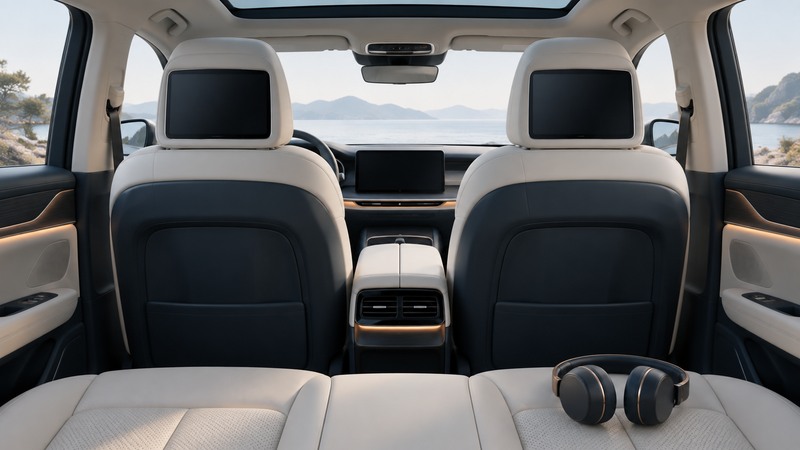
Choose rear-seat entertainment by starting with the seat and passenger arrangement. A screen can be useful only when its mounting, power and controls work with the vehicle’s equipment. Compare factory systems, vehicle-specific replacements and removable devices using the same compatibility and usability record.
Preserve the seat’s protective functions
Identify the exact vehicle, seat option and head-restraint design. Read the vehicle’s instructions before considering a replacement headrest or a mount around its posts. Appearance and post spacing alone cannot establish that an accessory preserves adjustment, locking or other seat functions.
For a specific example, Tesla’s Model Y front-headrest guidance states that its front headrests are not adjustable and that Tesla does not recommend altering or removing the head restraints. Other vehicles have different designs. Obtain a documented application for your exact seat instead of transferring an installation idea between models.
Ask the installer to explain any interaction with seat wiring, airbags, adjustment, folding and child-restraint installation. Do not cut a head restraint or route cables through a seat on the strength of a generic video. If compatibility is unresolved, keep the seat intact and investigate another entertainment arrangement.
Compare complete passenger systems
On a narrow screen, scroll the table horizontally. Keyboard users can focus its region and use the arrow keys.
| Option | Compatibility question | Everyday question |
|---|---|---|
| Factory rear entertainment | Was this system supplied for this vehicle and seat? | Which inputs, headphones and replacement parts remain supported? |
| Vehicle-specific screen/headrest system | Does the documented application match the exact seat? | Can passengers use it with normal seat positions? |
| Removable device and mount | Is the mount approved for the device and compatible with the vehicle instructions? | Can it be secured, removed and stored without loose cables? |
| Handheld device used while parked | Where will it be safely stowed before driving? | Does this meet the family’s actual entertainment need? |
VOXX’s 2014 custom-headrest installation guide (PDF) provides a historical example of product-specific installation documentation. Use instructions matching the actual system and vehicle application, and obtain qualified installation. The existence of a manual for one product does not approve it for another seat.
Ask for the full installed price, including mounts, power components, headphones and any required media subscriptions. Identify which components can be replaced separately. A failed screen should have a support route that does not depend on guessing at seat disassembly.
Test from the seats that will be occupied
Set the front seats to their normal driving positions. With the vehicle parked, check screen angle, reflections, reach and legroom from each rear position that matters. Fit the household’s child seats according to both sets of instructions and verify that the entertainment equipment does not interfere with installation or adjustment.
Have an adult passenger try selection, pause, volume and switching between programs. Check whether one screen can be dark while the other plays, and whether separate headphones work as intended. Keep driver-facing video disabled during driving and do not bypass a vehicle’s video interlocks.
Make comfort an observation rather than a guaranteed benefit. If a passenger dislikes the viewing angle or becomes uncomfortable, stop use and choose a different activity. A higher-resolution screen does not answer that individual question.
Prove playback before a trip
Record the exact supported inputs and formats from the system manual. A USB socket may have a different purpose from the one you expect. Check whether your subscription and app permit the intended playback route, downloads and simultaneous users. Protected streaming content can behave differently from a local test video.
Charge devices and pair headphones before departure. Store account credentials privately and use appropriate parental settings. Confirm the expected shutdown behavior so equipment is not unintentionally left operating after the trip.
Keep the installation and use record
At handover, have the installer demonstrate normal seat movement, restraint locking, secure equipment, clear cable routing and the agreed screen functions. Report new warning lights, pinched wiring, loose parts or altered seat operation immediately. Follow the product’s inspection and maintenance instructions.
Save the application documentation, part numbers, manuals, installer invoice and support contact. Recheck the arrangement when a child seat, seat position, device or mount changes. Before transferring the vehicle, remove personal accounts and provide the next owner with the equipment record.
Save a practical worksheet
Download the headrest screens worksheet (plain text). Open it in any text editor, save a private copy, and fill in the prompts while you work. It includes the article link and supporting references. Record “unknown” when a question still needs evidence.