A Mars image becomes much more useful when you know who took it, what the instrument measures, how large the scene is and how the picture was processed. Start with the original image record, then connect the detail you see to the larger landscape.
This guide works for casual exploration, a classroom activity or research preparation. You need a browser and a place to keep notes. The plain-text observation sheet keeps the image identifier, evidence and interpretation together.
Choose an archive for your question
| Source | Best starting use | Check before interpreting |
|---|---|---|
| NASA Photojournal | Captioned mission images with identifiers and downloadable versions. | Target, mission, instrument, credit, processing description and the distinction between release and observation dates. |
| HiRISE, University of Arizona | Detailed orbital views of terrain from Mars Reconnaissance Orbiter. | Image scale, projection, illumination and which color or grayscale product you opened. |
| Perseverance image browser | Explore camera images by Martian day and camera selection. | Camera, sol, Earth timestamp and whether a display is raw or color-processed; public browsing products may differ from calibrated science data. |
| NASA Planetary Data System | Find archived science products and their documentation. | Product level, labels, calibration and geometry requirements. Read the dataset documentation before treating pixel values as physical measurements. |
For a first exercise, choose a captioned orbital view of a named feature. Save its record URL before downloading anything. A mission-specific identifier lets you find the same observation again even if the website's navigation changes.
Read these six things before zooming in
- Mission and instrument. An orbital camera sees a landscape from above; a rover camera sees objects at different distances. An infrared instrument may measure properties your eyes cannot see.
- Observation date. A release date or website update can be years later than the observation. A sol is a Martian solar day, and mission sol counts have their own starting points.
- Location and orientation. Check the named site, coordinates if supplied, north direction and camera viewpoint.
- Scale. Look for metres per pixel, a scale bar or the stated scene width. Match the value to the exact image product.
- Processing. Identify a mosaic, color composite, map projection, contrast enhancement or terrain rendering.
- Credit and caption. Keep the exact credit with a reused image and check the source's usage policy.
NASA's images and media guidance explains use and attribution considerations. Some material carries third-party rights, and NASA names or imagery should not imply endorsement. Read the individual record as well as the general guidance.
Worked example: read Nirgal Vallis
Open NASA's Nirgal Vallis record, PIA03756. It identifies Mars Odyssey and its Thermal Emission Imaging System (THEMIS). The title gives a March 27, 2002 release date, while the record also has an image-addition date. Neither label should automatically be copied into an “observation date” field.
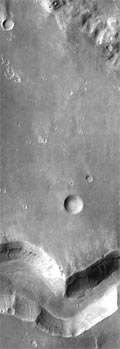
The source describes a footprint approximately 22 kilometres wide and 60 kilometres long, with north toward the top. Those dimensions describe the published scene, not the whole valley system. Read the caption before interpreting the small version above.
- Find the broad channel. Follow its bends through the surrounding cratered terrain.
- Separate walls from floor. Compare steep boundaries with the different textures inside them; use the larger source image for small features.
- Write an observation. For example: “The valley bends across the scene, with smaller features along its margins.”
- Then write the interpretation. The 2002 caption discusses candidate water-related processes and uncertainty about valley formation. Treat that as a dated interpretation to compare with later research.
A channel's appearance alone gives an incomplete account of its origin. Additional geometry, mineral observations and geological relationships help test an explanation. The water evidence guide shows how to connect those kinds of evidence.
Color, contrast and mosaics serve different purposes
“Color image” can describe several products. An approximation of human-visible color, an enhanced-color composite and a map assigning colors to a measured quantity have different meanings. Read which bands were used and how they were displayed. A blue region in a compositional image needs the legend before it can be interpreted.
For a concrete comparison, the HiRISE record for Sustained Bright Patches offers grayscale, infrared-red-blue and RGB products, along with map-projected and other versions. The record lists different image scales and explains which product to use for scale. Choose the documented product that matches your question.
A mosaic joins frames, sometimes acquired with changing viewpoints or lighting. A map projection transforms the image into a geographic coordinate system. Both can make comparison easier, while adding processing choices worth recording. Cropping and resizing for a webpage change the display size again.
Estimate size only when the geometry supports it
For a documented, uniformly scaled map-projected image, a first estimate is:
Feature length = measured image pixels × ground distance per pixel.
A rover's perspective view usually changes scale with distance. An oblique orbital image can also distort apparent dimensions. When geometry or scaling is unavailable, describe the feature qualitatively and record the missing information. Digital enlargement cannot reveal details that the instrument never resolved.
Keep a record another reader can follow
Download the observation sheet, then complete one entry for one image. Keep your visible observations separate from the caption's interpretation and from your own questions. If a date, scale or processing detail is absent, mark it “not supplied” rather than filling it from a different image.
When comparing two observations, check location, geometry, season, illumination and processing first. A change in shadow or contrast can resemble a surface change. Keep both product identifiers and explain why the comparison is fair.
Continue with the Mars exploration primer or browse Space Exploration. The most useful image note is a small, reproducible piece of reasoning: this record, this observation, this interpretation, this remaining question.