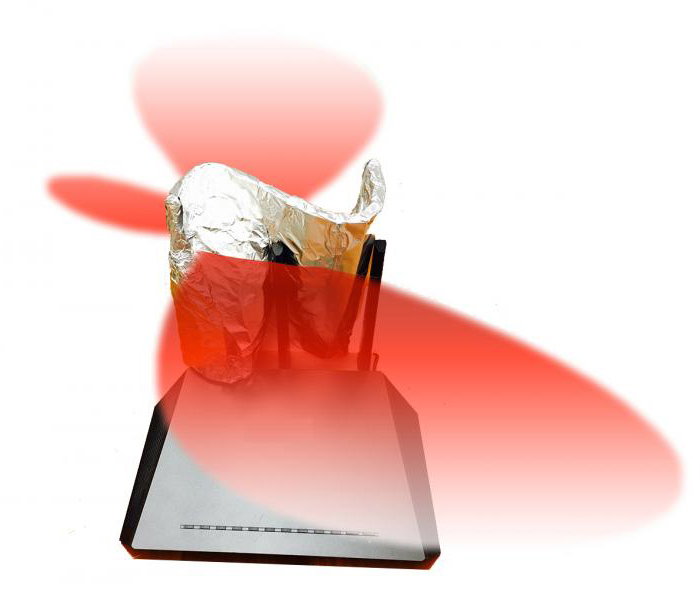
A Wi-Fi antenna reflector is a simple idea with real physics behind it. Radio waves reflect from conductive surfaces. If a reflector is placed behind an antenna, some of the energy that would have gone in one direction can be redirected toward another. That can improve reception in a target room and reduce leakage into areas where coverage is not wanted.
The trick is that Wi-Fi indoors is messy. Signals bounce from walls, floors, appliances, mirrors, ducts, furniture, and people. Modern routers also use multiple antennas, beamforming, MIMO, mesh coordination, and several frequency bands. A reflector can help in the right situation, but it can also make a network worse if it blocks an antenna pattern the router was designed to use.
The Dartmouth Reflector
The 2017 Dartmouth-led research on 3D-fabricated Wi-Fi reflectors gave a systematic version of an old household experiment: placing a metal shape behind a router to direct signal. Instead of using a random soda can or foil sheet, the research team used software to design a custom reflector for a particular room layout and coverage goal.
The work, presented at ACM BuildSys 2017, used a 3D-printed plastic form covered with a thin metal layer. Given an access point location, a floor plan, and target regions to strengthen or weaken, the system computed a reflector shape and placed it around the router. In tests, the reflectors could boost signal in desired areas and reduce signal in others.
What a Reflector Can Do
A reflector does not create new transmit power. It redistributes the energy already being radiated. In a simple layout, that can be useful: less signal goes into a hallway, outside wall, neighbor-facing direction, or unused room, while more reaches a home office, conference area, workshop, or classroom.
This makes the reflector a physical coverage-shaping tool. It can improve performance where the main problem is direction, not overall network capacity. It can also reduce casual signal leakage, though it should never be treated as the main security mechanism.
Security Benefits and Limits
Reducing Wi-Fi signal outside a desired area can slightly improve security by making the network harder to receive from a parking lot, sidewalk, neighboring suite, or adjacent apartment. That is useful, but it is not enough by itself.
Strong Wi-Fi security still depends on WPA3 or at least WPA2-AES, a strong passphrase, current firmware, disabled WPS, separate guest access, careful IoT segmentation, and good router administration. A reflector can shape the radio footprint; encryption and configuration protect the network.
Why Modern Routers Complicate It
Many current routers use internal antennas rather than visible external rods. They may rely on multiple antennas working together for spatial streams, beamforming, diversity, and band steering. Covering part of the device with metal can interfere with thermal design, antenna tuning, or multi-antenna operation.
Mesh systems add another complication. A mesh node needs to hear both clients and other mesh nodes. A reflector that improves one room may weaken the backhaul link to the rest of the network. Before using a reflector, it is worth measuring whether the problem is weak coverage, interference, poor placement, overloaded channels, slow internet service, or a bad mesh topology.
Best Uses
A reflector is most plausible when an access point has external antennas, the desired coverage is mostly in one direction, and there is a clear area where signal should be reduced. It may help in a long apartment, a classroom, a small office, a garage workshop, or a router mounted near an exterior wall.
It is less likely to help when the problem is too many devices, congested spectrum, poor backhaul, old client hardware, thick masonry, a router hidden in a cabinet, or a network that needs coverage in every direction.
Better First Steps
Before shaping the signal with a reflector, start with ordinary network hygiene. Move the router into the open, away from metal cabinets and floor level. Place it closer to the center of the coverage area. Use Ethernet backhaul for mesh nodes when possible. Separate 2.4 GHz, 5 GHz, and 6 GHz expectations: lower frequencies reach farther, while higher frequencies can be faster but less forgiving through walls.
Update firmware, choose reasonable channel settings, avoid placing access points too close together, and test with a real Wi-Fi analyzer or the router's own diagnostics. A reflector is easier to judge once the basic layout is not fighting the network.
Frequency Bands
Reflector behavior changes with wavelength. A shape that works well at 2.4 GHz may not perform the same way at 5 GHz or 6 GHz. Wi-Fi 6E and Wi-Fi 7 equipment may use 6 GHz channels that have shorter range and different reflection behavior than older 2.4 GHz networks.
That does not make reflectors obsolete. It means a casual foil shape is unpredictable. A custom reflector designed for a specific band, router, and room is more defensible than a general-purpose accessory promising miracle range.
Legal and Practical Boundaries
Wi-Fi equipment is regulated. Users should not modify transmitters, amplifiers, or antennas in ways that exceed allowed power or violate device certification. A passive reflector is different from adding an amplifier, but it can still change the effective direction of radiated energy. Commercial and outdoor uses deserve extra care.
There are also practical safety boundaries. Do not block router vents, wrap the router body in metal, place conductive material where it can contact electronics, or create a heat trap. The most useful reflector is a controlled shape placed near antennas, not a foil blanket around the device.
When to Upgrade Instead
If coverage problems persist, a better access point, wired mesh node, additional Ethernet run, outdoor-rated access point, or proper directional antenna may be the right answer. For businesses, a site survey and professionally managed access points usually outperform improvised hardware.
A reflector is attractive because it is cheap and clever. Its best role is not replacing modern network design, but solving a narrow coverage-shaping problem where the direction of radio energy is the main issue.
The Larger Lesson
The Dartmouth reflector showed that wireless coverage can be shaped physically, not only configured in software. That idea remains relevant as homes and offices fill with radios. Walls, antennas, materials, and placement matter as much as settings in an app.
Wi-Fi often improves when users stop thinking of the router as a magic box and start treating it as a radio. A custom reflector is one expression of that mindset: understand where the signal goes, decide where it should go, and shape the environment accordingly.