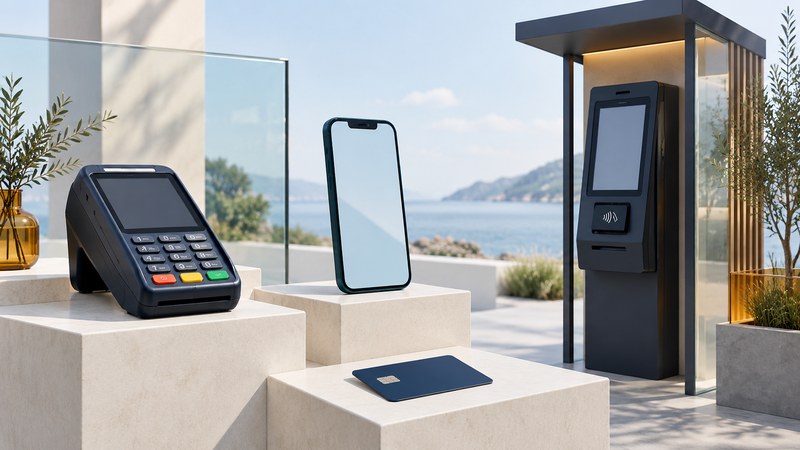
Choose payment acceptance around where the customer pays and how the sale reaches your records. A countertop terminal, a portable reader, a phone running an approved payment app and an unattended kiosk solve different problems. The right setup makes payment, receipts, refunds and daily reconciliation work together.
This merchant guide covers technology available in October 2026. Exact support depends on country, provider, device, software and contract. Use the comparison below to prepare a provider discussion and a small operational trial.
Separate the payment method from the equipment
The customer presents a card or wallet; the acceptance device captures the payment interaction; the payment service connects it to processing; and the point-of-sale system records the order. These functions may come in one package or several integrated products.
- EMV chip and contactless: ask which card networks, debit routes and verification methods the provider supports on the chosen terminal.
- Phone and watch wallets: compatible wallets can use contactless acceptance. Confirm acceptance with the provider and test the actual flow.
- Tap to phone, sometimes called SoftPOS: a supported smartphone and payment app serve as the merchant's contactless acceptance device.
- QR codes and payment links: the customer follows a checkout flow on their own device. Ask which payment method, provider, confirmation and dispute rules apply to that flow.
A printed QR code, by itself, tells you little about the underlying payment. Confirm the destination, how it matches an order and where the merchant sees an authenticated payment result. Release goods using the provider's confirmed status, rather than a customer's screenshot.
Compare the setup with the working environment
| Setting | Setup to evaluate | Checks that matter |
|---|---|---|
| Fixed checkout counter | Integrated chip/contactless terminal | POS connection, refund workflow, receipts, cabling and accessible placement. |
| Market stall or mobile service | Portable reader or supported tap-to-phone app | Battery, mobile coverage, supported cards, weather exposure and fallback. |
| Drive-through or curbside | Suitable handheld device or fixed outdoor terminal | Customer reach, glare, order matching, staff workflow and environmental ratings. |
| Unattended kiosk or machine | Purpose-built unattended payment assembly | Machine integration, mounting, tamper controls, remote support and failure recovery. |
Begin with the busiest realistic transaction. Include a customer who needs more time, a declined card, a receipt request and a refund. A fast demonstration with one payment type leaves much of the daily workload untested.
What tap to phone changes
A supported phone can reduce the equipment needed for attended contactless acceptance. For example, Apple's Tap to Pay documentation explains that payment apps integrate with a supported payment service provider, which supplies certified terminal configurations. The complete app, provider and device combination matters.
The PCI Mobile Payments on COTS standard addresses payment acceptance on ordinary commercial devices, including contactless and PIN-related capabilities. PCI SSC encourages merchants and acquirers to use its solution listings when selecting an appropriate MPoC solution. Ask the provider to identify the exact solution and its current support status.
Check the supported phone model, operating system, country, card brands, PIN behavior and receipt options. Plan for charging, staff access, lost-device response and software updates. A customer with a card that cannot use the supported contactless flow will need another accepted method. The phone's physical design also limits where it can sensibly be deployed.
Outdoor and unattended terminals need a complete installation
Use the manufacturer's documentation for the exact model and installation. Ingress protection, impact resistance and operating temperature describe different properties. The mounting, enclosure, cable entries, power supply and exposure conditions all affect whether the finished assembly suits the site.
As a concrete comparison, Ingenico's self-service range lists different environmental ratings and deployment uses across its models. Select a model through the provider and installer using its current technical documentation. A rating on one component does not establish suitability for the entire kiosk.
- Customer access: check reach from the intended position, screen visibility in sun, space for a card or phone, and the accessibility of PIN entry and instructions.
- Site conditions: document rain, dust, temperature, cleaning practices and potential impact. Have the installer assess the complete assembly.
- Order matching: make the amount and order clear before payment, especially where several drive-through orders are active.
- Support: establish inspection responsibilities, tamper-response procedures, remote monitoring and replacement times.
For a machine that dispenses goods or starts a service, define what happens when payment succeeds but delivery fails. The operator needs an order reference, an exception record and a practical refund route.
Agree on outage behavior and the full cost
Ask what happens when the internet, local network, phone battery or POS connection fails. Some configurations can store transactions for later processing; others stop accepting payments. As Stripe's smart-reader offline documentation explains, stored payments are forwarded for authorization after reconnection, and the merchant bears the risk of a later decline. Verify the provider's limits, forwarding deadlines and merchant responsibility for that precise setup.
Compare equipment purchase or rental, software subscriptions, processing charges, connectivity, refund and dispute charges, support, replacement and termination terms. Use a representative month of your own transaction counts and basket sizes to compare quotes. A headline percentage can hide costs that matter more to a small or seasonal business.
Ask your acquirer or payment provider which PCI validation and operating responsibilities apply to your business. Keep staff accounts controlled, software supported and device inspections assigned. Product approval supports selection; ongoing merchant procedures still need an owner.
Run a small trial before rollout
- Map one sale. Follow its order number from the POS through payment, receipt and settlement report.
- Test supported methods. Use the provider's test environment first, then an agreed live validation procedure.
- Exercise exceptions. Check a decline, cancellation, full and partial refund where supported, and a lost connection.
- Check uncertain outcomes. Establish how staff look up the existing transaction before attempting another charge.
- Reconcile a day. Explain differences among sales, refunds, fees and the amount paid into the merchant account.
- Train and document. Keep a support contact, fallback method and replacement procedure available to staff.
Use the editable payment-provider and pilot checklist to record answers for your actual site. It includes blank fields rather than assumed fees or equipment ratings.
For customer-facing instructions, see how to tap, confirm and troubleshoot and payment-enabled wearables. For joining payments to orders and stock, use the web-enabled store integration guide.