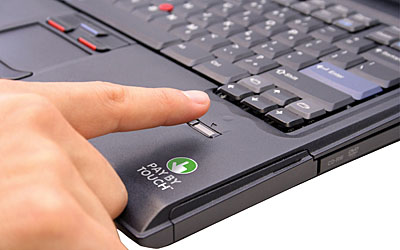
Touch-based biometric payment once sounded like a futuristic retail shortcut: slide a finger, identify yourself, and pay without typing account numbers or carrying a card. The idea was simple and compelling. Consumers wanted checkout to be faster, merchants wanted fewer abandoned purchases, and security teams wanted stronger proof that the person paying was authorized to do so.
In 2006, Pay By Touch Online presented one version of that future. The service used finger-scan authentication, encryption, secure data centers, stored payment credentials, shipping information, and frequent-shopper details to support express sign-in, multi-factor authentication, and express checkout. A shopper would slide a finger across a scanner connected to a computer, and the system would use the biometric match to help identify the shopper and complete a purchase.
From Fingerprint Readers to Passkeys
The biggest change since early fingerprint-payment systems is where biometric authentication happens. Modern systems increasingly keep the biometric check on the user's own device. A phone, laptop, or hardware authenticator verifies the fingerprint, face, PIN, or pattern locally, then uses cryptographic credentials to prove to a website or app that the right user is present.
This is the logic behind passkeys. A passkey is not a fingerprint stored by a merchant. It is a FIDO authentication credential tied to an account, unlocked by the same method a person uses to unlock a device. The site receives a cryptographic proof, not a reusable password and not the consumer's biometric template.
Why Biometrics Appealed to Shoppers
Biometrics promised to remove some of the worst parts of online checkout: forgotten passwords, repeated address entry, card typing, account recovery, and fear that payment details might be stolen. The appeal was especially strong when ecommerce felt less mature and consumers were still learning whether online transactions were safe.
The convenience argument remains strong. People unlock phones with a glance or touch many times a day, then use those devices to approve wallet payments, banking activity, password manager access, and account sign-ins. Good biometric authentication reduces friction because it asks the user for a familiar gesture at the moment trust is needed.
Why the Architecture Matters
Biometric data is different from a password because it is permanent and deeply personal. A password can be changed after a breach; a fingerprint cannot. That is why modern authentication design tries to avoid sending biometric templates to merchants or storing them in broad central databases.
Device-based biometrics and passkeys improve the architecture. The biometric check unlocks a private credential on the device, while the service verifies the result using public-key cryptography. That separation matters: the merchant does not need to know the fingerprint, and attackers cannot reuse a stolen password if no password is shared in the first place.
Payments Are a Natural Use Case
Payments need both security and speed. A checkout step that is too slow loses sales, while a checkout step that is too weak invites fraud. Biometric approval can help by confirming user presence at the moment a transaction is initiated, especially when combined with device possession, tokenized payment credentials, risk scoring, and transaction details shown clearly to the shopper.
Mobile wallets made this model familiar. A consumer taps a phone or approves an online payment after unlocking the device with a fingerprint, face, PIN, or passcode. Passkeys extend a similar idea to websites and apps: the user approves the action locally, and the service receives a phishing-resistant authentication response.
The Pay By Touch Lesson
Pay By Touch was early in seeing that identity, payment, loyalty, and checkout convenience would converge. Its online service combined express sign-in, multi-factor authentication, and a stored wallet. It also recognized that shoppers did not want to repeatedly type usernames, passwords, shipping addresses, and financial information.
The lasting lesson is not that every retailer should collect fingerprints. It is that checkout works best when authentication, payment, and identity are integrated without making the customer do extra work. The modern version accomplishes that with device biometrics, passkeys, tokenization, and wallet rails rather than a merchant-centered biometric database.
Privacy and Consent Are Central
Biometric systems can create serious privacy risks if they are poorly designed, poorly explained, or used beyond the purpose consumers expect. Fingerprints, facial geometry, voiceprints, gait, palm patterns, and behavioral biometrics can reveal identity in ways that feel far more sensitive than an email address or cookie.
Companies using biometric technologies should provide clear notice, obtain appropriate consent, minimize collection, define retention periods, secure templates, avoid hidden secondary uses, and give consumers meaningful controls. The more sensitive the data, the less patience consumers and regulators have for vague promises.
Security Is Not Automatic
Biometrics can improve security, but they do not magically make a system secure. Attackers may target account recovery flows, device enrollment, help desks, malware, payment credentials, synthetic identities, or weak fallback methods. A biometric check is only one part of the trust chain.
Strong systems combine biometric user verification with device security, cryptographic credentials, transaction monitoring, phishing resistance, secure recovery, fraud controls, and careful logging. Recovery deserves special attention because attackers often go around the strongest front door and attack the process for replacing a lost key or device.
Accessibility and Choice Matter
Not everyone can or wants to use a fingerprint or face scan. Injuries, disabilities, aging, occupational wear, religious concerns, privacy preferences, device limitations, and environmental conditions can all affect biometric use. A good payment or sign-in system gives people secure alternatives without making them feel second-class.
Passkeys help here because the user-verification method can vary by device. One person may use a fingerprint, another a face scan, another a device PIN, and another a hardware security key. The service can benefit from phishing-resistant authentication without dictating one biometric modality for everyone.
What Merchants Should Evaluate
Merchants considering biometric or passkey-enabled checkout should ask practical questions. Does the system reduce checkout abandonment? Does it integrate with existing payment processors and wallets? Does it avoid storing biometric templates? Does it support account recovery safely? Does it work across devices, browsers, and accessibility needs? Does it make the privacy promise easy to understand?
The strongest implementations are invisible in the right way. The shopper experiences a quick approval step, while the merchant gets stronger authentication, fewer passwords, lower fraud exposure, and less sensitive data to protect.
Where Touch Authentication Is Going
Touch authentication has moved from specialized scanners toward everyday devices. Fingerprint readers, face authentication, passkeys, secure enclaves, mobile wallets, and hardware security keys are now part of the same broader movement away from passwords and toward local user verification plus cryptographic proof.
The original dream of Pay By Touch was a faster, safer checkout. The modern version is more subtle and more privacy-aware: prove the right person is present, keep biometric data close to the user's device, share only what the merchant needs, and make payment feel simple without making identity feel exposed.